

TikTok API (Advanced Actions)
The TikTok API Advanced Actions let you run operations directly on your TikTok Business account without leaving NicoChat. These actions can be used inside your automation flows.
The TikTok API Advanced Actions let you run operations directly on your TikTok Business account without leaving NicoChat.
These actions can be used inside your automation flows to fetch videos, reply to comments, like posts and much more.
In the flow builder:
Actions → Advanced → TikTok API
Every TikTok API action follows the same format:
The actions are organized by resource type:
Gets detailed information about the connected TikTok Business account.
Sample response:
{
  "display_name": "Nicola Occhipinti",
  "username": "nicola.om",
  "is_business_account": true,
  "profile_deep_link": "https://vm.tiktok.com/ZMAPqstW5/",
  "profile_image": "https://p16-sign-va.tiktokcdn.com/.../avatar.jpg"
}
Common uses:
- Show the connected account data in the chatbot panel
- Check whether the account is a Business account before running automations
- Show the profile picture and public name in the flow
Returns a list of videos published on the account.
Optional parameters:
Limit— sets how many videos are returned (default: 10)
Sample response:
{
  "videos": [
    { "item_id": "7563630498665286919", "caption": "🚀 Aumente suas conversões no real!" },
    { "item_id": "7563628163410955538", "caption": "A IA descobriu o gameplay..." }
  ]
}
Common uses:
- Get video IDs for comment automations
- Create reports or lists of published videos
- Send automatic messages related to the latest content
Returns detailed information about a specific video.
Main fields:
Video ID— video ID (usually captured through a trigger or a variable)
Common uses:
- Fetch the video title, caption or metadata before generating an automated reply
- Send replies based on the video content
- Build context-aware AI flows (e.g., reply to comments based on the video topic)
Publishes a new video directly from NicoChat (on accounts with permission).
Checks the publishing status of videos sent through the API.
Lists all the comments on a specific video.
Parameter: Video ID
Returns a list with comment_id, username, text and timestamp.
Gets the details of an individual comment.
Returns existing replies within a parent comment.
Publishes a new comment on a video.
Required fields:
Video IDMessage
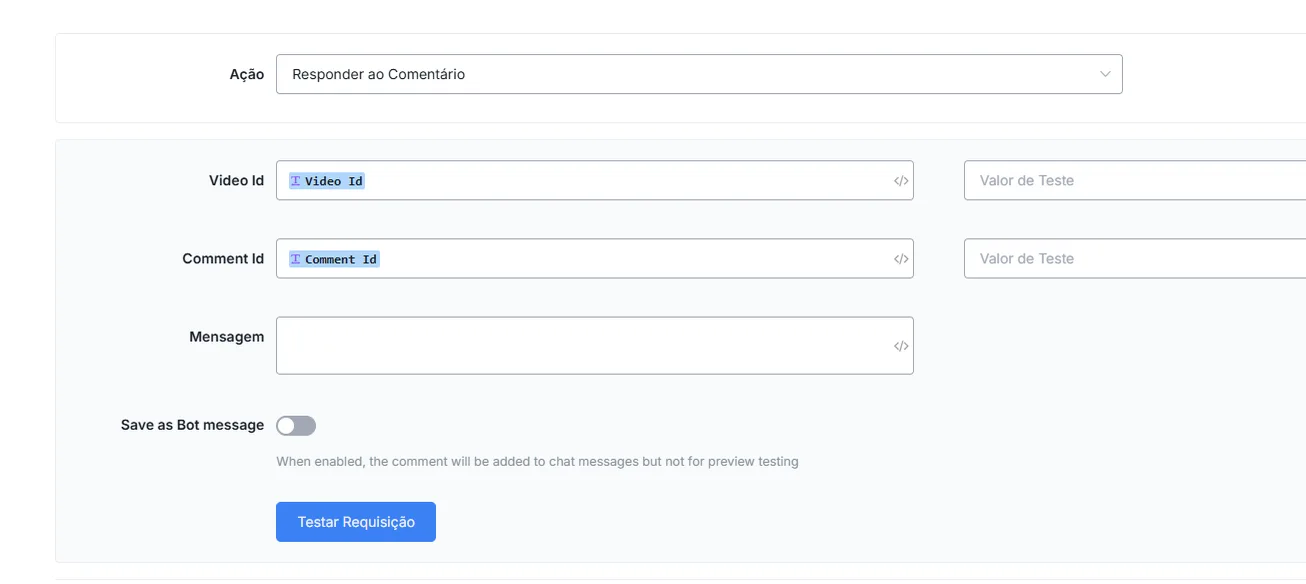
Replies directly to an existing comment.
Required fields:
Video IDComment IDMessage
Practical example:
The flow fetches the video ID and the comment ID, and runs the Reply to Comment action with the message “Yes! We have it available in all colors 😄”.
Additional option:
Save as Bot Message— saves the reply in the bot history (optional).
Adds a like to a specific comment.
Required field: Comment ID
Removes the like from a previously liked comment.
Required field: Comment ID
Makes the comment invisible to the public (it stays visible to the author and to the administrator).
Required field: Comment ID
Reverses the hide action, making the comment public again.
Required field: Comment ID
Permanently removes a comment from a video.
Required field: Comment ID
- Trigger: TikTok Comment Created
- Action 1: TikTok API → Get Video Info
- Action 2: AI generates a personalized reply based on the caption
- Action 3: TikTok API → Reply to Comment
- Trigger: TikTok Comment Created
- Action 1: TikTok API → Like Comment
- Action 2: TikTok API → Reply to Comment with a friendly message
- Trigger: TikTok Comment Created
- Condition: If the text contains offensive words
- Action: TikTok API → Hide Comment
- Action: Send an internal alert to the team