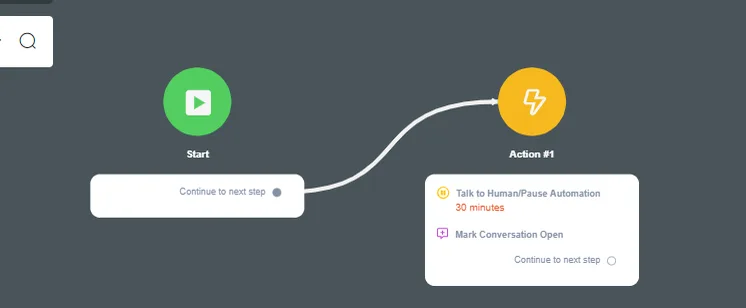
Conversation start prompt
NicoChat now offers even more flexibility to human agents. Users can now choose what starts or restarts a conversation. Previously, when the agent marked a conversation as “Done”, it went to the Done folder; but, if the contact got in touch again, the conversation automatically went back to the “Open” folder.
This causes confusion among human agents, who cannot tell apart the chats that need human support from the ones that do not. Users can now opt in to this Live Chat behavior.
In the side menu of your flowbuilder, scroll down and click the Settings tab. Click the “Live Chat” tab and scroll down until you see “Live Chat Resources”
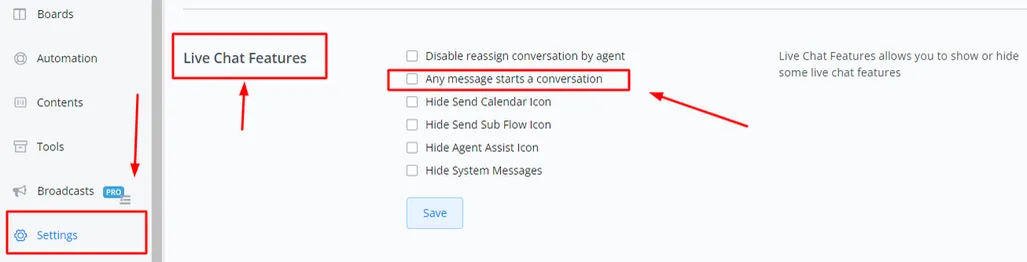
Click Save to record the changes
Whenever this option is enabled, every new reply or message from the contact WILL open the conversation; and, if the conversation has been moved to the “Done” folder and the contact gets in touch again, it will be moved automatically from the Done folder to the Open folder.
Whenever this option is disabled, every new reply or message from the contact will NOT open the conversation; and, if the conversation has been moved to the “Done” folder and the contact gets in touch again, it will remain in the Done folder until a human agent moves it or until it is moved by a flow automation.
You can still use flow automations to move conversations from the Done folder to the Open folder. This also lets you build flow logic or apply specific conditions so that the conversation is moved from Done to Open.