

Channel Connection Wizard
After creating your account (or whenever you want to connect one more channel, through the "Connect another channel" button on the Dashboard), NicoChat guides you through a wizard to get the channel up and running.
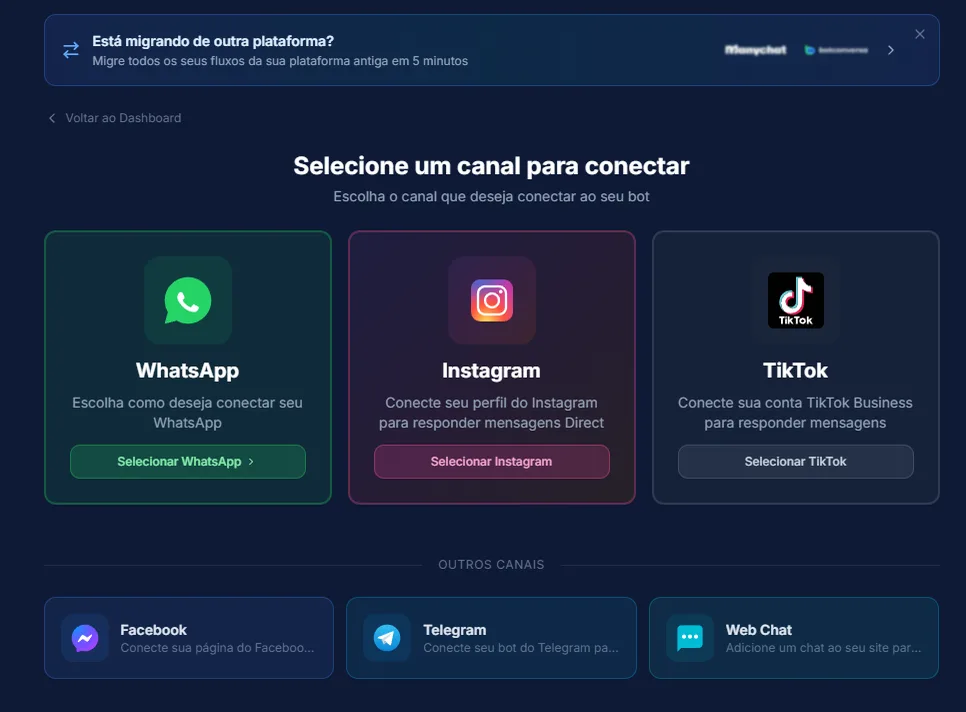
- Official WhatsApp API ("Recommended" badge) — connects through Meta authorisation
- WhatsApp QR Code — through NicoZap (recommended) or through an external provider (Evolution, Z-API, UazApi)
- Instagram, Facebook (Messenger) and TikTok — connect through Meta
- Telegram — paste the bot token generated in BotFather
- Webchat — chat widget for the company website
- Just testing — creates a test bot without connecting a real channel
- Choose the channel — the screen shows how many you already use and your plan limit; at the limit, creation is blocked (but you can still link a different type to the existing central bot).
- Reuse or create a new one — if the type already had previous connections, the options "Open Bot", "Link to Omni" or "Create exclusive bot" appear, along with "Connect new".
- Connect, according to the channel (see details below).
- Success screen, with "Open Bot", "Connect another channel" or "Finish".
- Install template (optional) — you can go straight on to install a ready-made bot template on that channel; if the template requires integrations, the install button is only released once they have been set up.
- Meta (Official WhatsApp/Instagram/Facebook/TikTok) — "Connect" opens an authorisation pop-up; the system checks automatically for up to 60s (or click "I have connected" manually). For Official WhatsApp, the system tries to register the number automatically — a failure here does not block the rest.
- Telegram — paste the token (format
number:string, with an "Open BotFather" button). - Webchat — enter the website domain (1 domain per workspace); the system extracts the root domain and generates the installation code.
- WhatsApp QR Code through NicoZap — QR Code or pairing code on the phone.
- WhatsApp QR Code through another provider — each one asks for its own details (phone, API domain, instance, token).
Note
A "central bot" brings several different channels together — the wizard always tries to link to that central bot when possible. For WhatsApp QR Code, every connection is always new (it does not reuse one) and today only 1 connected WAAPI instance is allowed at a time.
Note
If you own a workspace on a free trial and have never scheduled an onboarding call, an invitation to schedule that call may appear during the process.
If the difference between connection and channel is still not clear, see What is the difference between a channel and a connection?.