

Frequently Asked Questions (WhatsApp Cloud API)
After you connect the phone number to the WhatsApp Cloud API, you will no longer be able to use that number in the WhatsApp Business app or in personal WhatsApp.
- How can I reply to customers on my phone?
After you connect the phone number to the WhatsApp Cloud API, you will no longer be able to use that number in the WhatsApp Business app or in personal WhatsApp.
You can log in to the NicoChat platform and use LiveChat to reply to your customers on your computer, or download the NicoChat mobile apps to reply straight from your phone.
- Can I use my current WhatsApp mobile number on the WhatsApp Cloud API?
You cannot use a number that is already in use on WhatsApp with the WhatsApp Cloud API. You need to delete the existing WhatsApp account in order to use the same number on the WhatsApp Cloud API, or use a completely separate number for the WhatsApp Cloud API account.
We recommend that you get a new number for the WhatsApp Cloud API.
- How can I delete a phone number from a business account?
To delete the phone number from your business account, see the link below.
developers.facebook.com/docs/whatsapp/phone-numbers#delete-phone-number-from-a-business-account
- I currently use 360Dialog. Do I need to switch to the WhatsApp Cloud API?
Below is the difference between 360Dialog and the WhatsApp Cloud API, in a table for your reference:
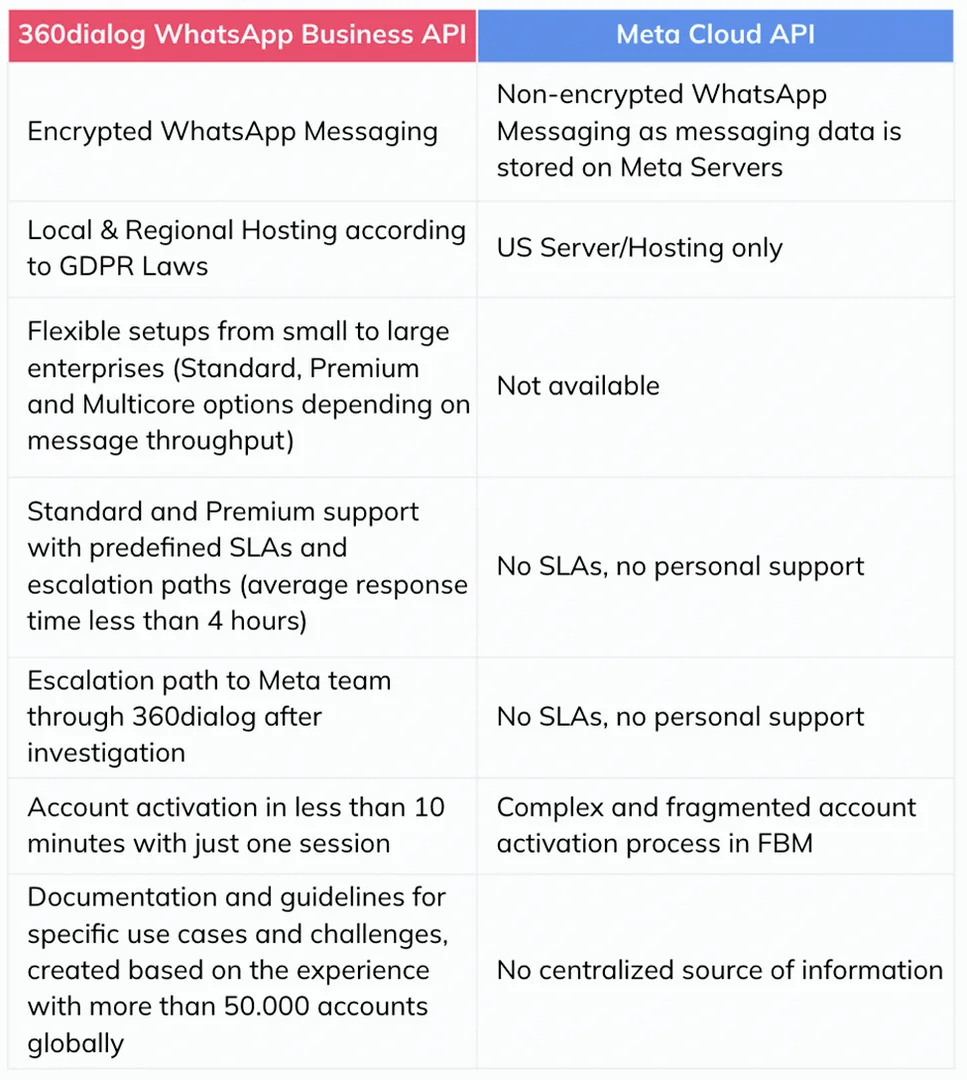
In short, with 360dialog the customer has access to different WhatsApp offerings (Cloud API, Business API, on-premise), to hosting and performance improvements (Premium Package, local hosting, multicore) and to different support levels and SLAs — none of which is offered directly by Meta.
If you use the WhatsApp Cloud API, it works out a little cheaper. You can get started easily with the test phone number and the 1,000 free session messages.
You can make your own decision based on the information above.
- Why can't I connect my business account to the WhatsApp Cloud API?
Currently, you can only connect a business account to one of the NicoChat workspaces. If you need to switch to another workspace, you will have to disconnect the account and connect it again in the new workspace.
- The error “#131008 invalid parameter” keeps happening, what should I do?
If all the other custom fields are filled in correctly and the invalid parameter problem persists, check whether the contact's phone number is in the correct format. Incorrect formats (a number without the country code, a number with the local area code, etc.) usually cause the invalid parameter problem.