

Marketing Messages Lite API for WhatsApp (MM Lite API)
The Marketing Messages Lite API (MM Lite API) is a new offering from Meta that makes it easier for businesses to send marketing messages on WhatsApp. It helps you run promotional campaigns more effectively, with better delivery rates, detailed performance data, and better results than the Cloud API. It is also designed to improve the customer experience by making sure your messages reach the right people at the right time.
After you connect through the Embedded Signup, you will see the "Check Status" option for the MM Lite API.
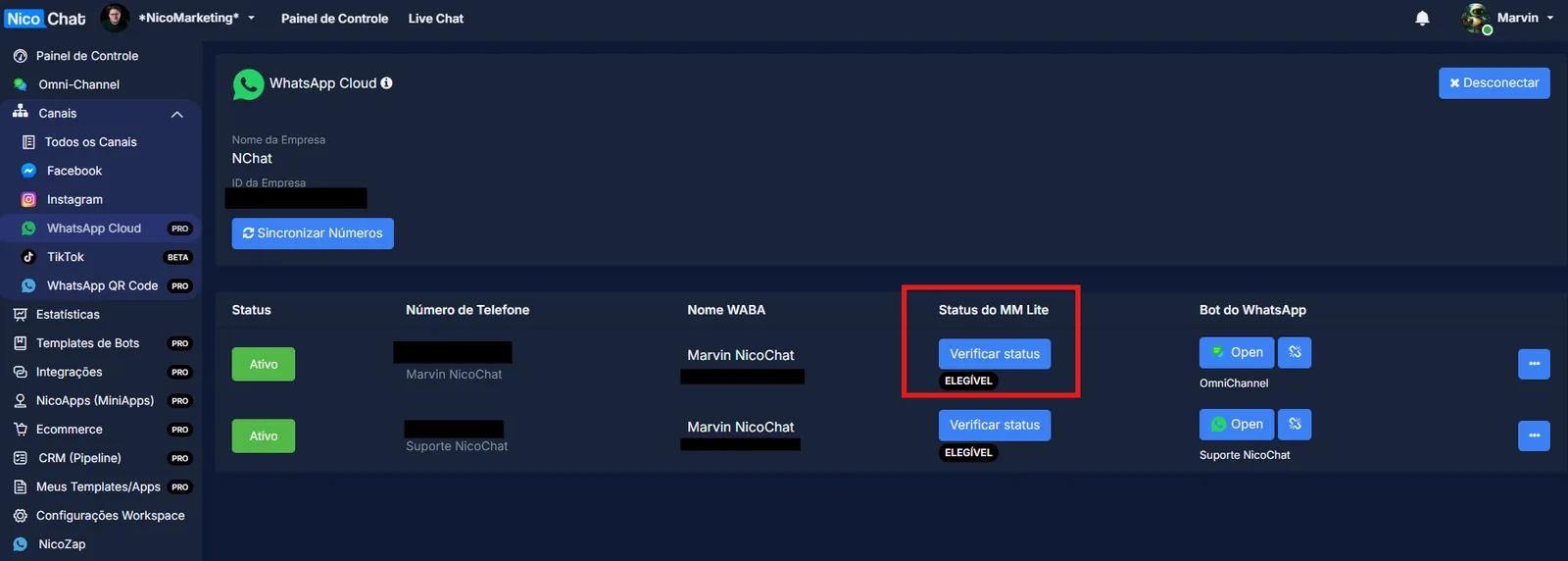
On the dashboard, if your number is already linked, you will see the "ELIGIBLE" label for MM Lite below the "Check Status" button.
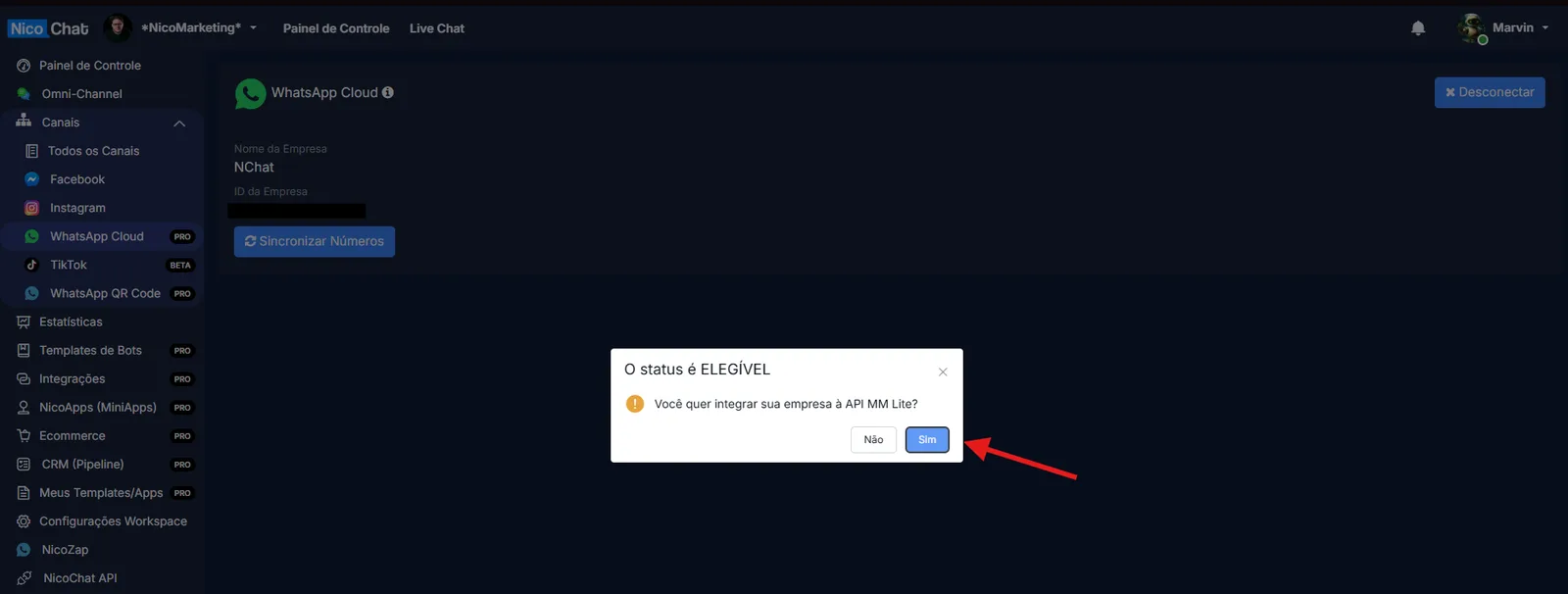
When you click the "Check Status" button, a pop-up window appears to onboard your business for the MM Lite API. Just accept it to continue.
When you use the platform, you will need to accept the terms of service. Where you do this depends on your connection method:
- If you connected through the old developer app, accept the terms of service in that app's dashboard.
- If you use the new method (Embedded Signup), the terms appear in the WhatsApp or Facebook Business Manager, under notifications and alerts.
After you accept the terms of service, it can take up to 1 hour for the status to be updated in your NicoChat dashboard.
Once the MM Lite API is enabled, NicoChat automatically handles all your marketing messages through this endpoint; there is nothing you need to change.
Here is a quick overview of how the messaging routes work:
- Marketing messages will be sent using the MM Lite API.
- Service messages, authentication, and free-form messages (such as replies within the 24-hour window) will continue to be handled by the WhatsApp Cloud API.
- The Marketing Messages Lite API is known for its high success rate in delivering messages. This helps businesses make sure their campaigns actually reach the right people, reducing bounce rates and avoiding unnecessary costs.
- Performance benchmarks that compare your message templates with similar templates in your region.
- Advanced analytics to track cost metrics (for example, cost per click) and web and app conversions.
- Scalable performance: whether you send 10,000 or even 1 million messages, MM Lite handles it all smoothly, with no slowdown and no loss of delivery efficiency.
The MM Lite API and the Cloud API were built to work together, but each one serves a different purpose.
- The MM Lite API focuses specifically on sending optimized marketing message templates, helping you achieve better delivery rates and offering advanced tracking features.
- The Cloud API, in turn, is more versatile and can handle all types of WhatsApp business messages, whether marketing, utility, or authentication.
You have a few options:
- You can choose to use only the Cloud API for all your messaging needs.
- You can use the MM Lite API for your marketing campaigns and rely on the Cloud API for everything else.
This way, you get the best delivery and performance benefits for your marketing messages with the MM Lite API, while keeping the flexibility to handle other types of business messages through the Cloud API.
With MM Lite Insights, you can easily track important metrics such as messages sent, delivered, read and clicked, the total amount spent, and button clicks.
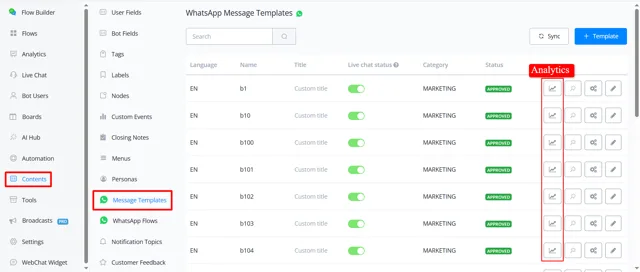
Just go to Content > Message Templates and click Analytics to get started.
Example of message analytics:
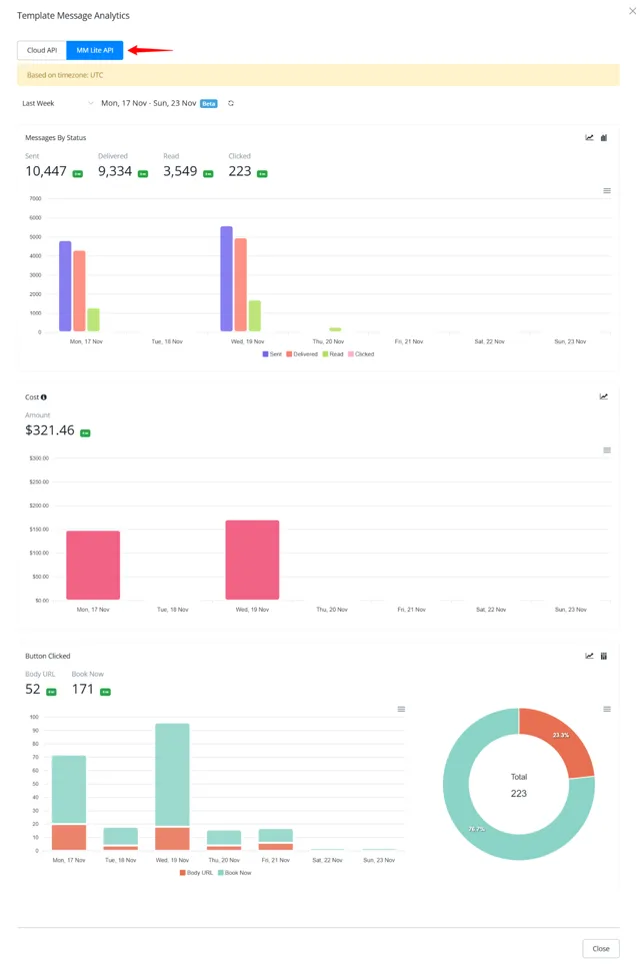
You can also view the analytics in WhatsApp Manager, on the Marketing Messages tab.