

Canal por API
¡Es posible conectar un canal por API en NicoChat! Esto permite utilizar NicoChat para automatizar las interacciones de un chat interno de tu sistema. La integración envía y recibe mensajes utilizando el Omni-Channel del workspace.
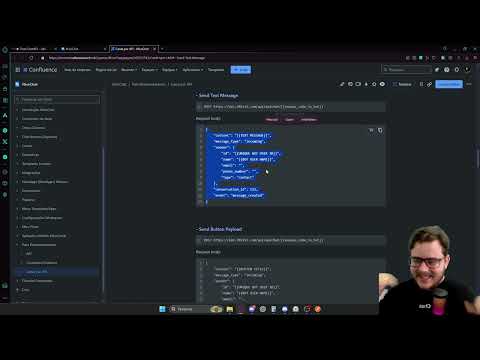
É possível conectar um canal por API no NicoChat! Isso possibilita utilizar o NicoChat para automatizar as interações de um chat interno do seu sistema. A integração envia e recebe mensagens utilizando o Omnichannel da workspace.
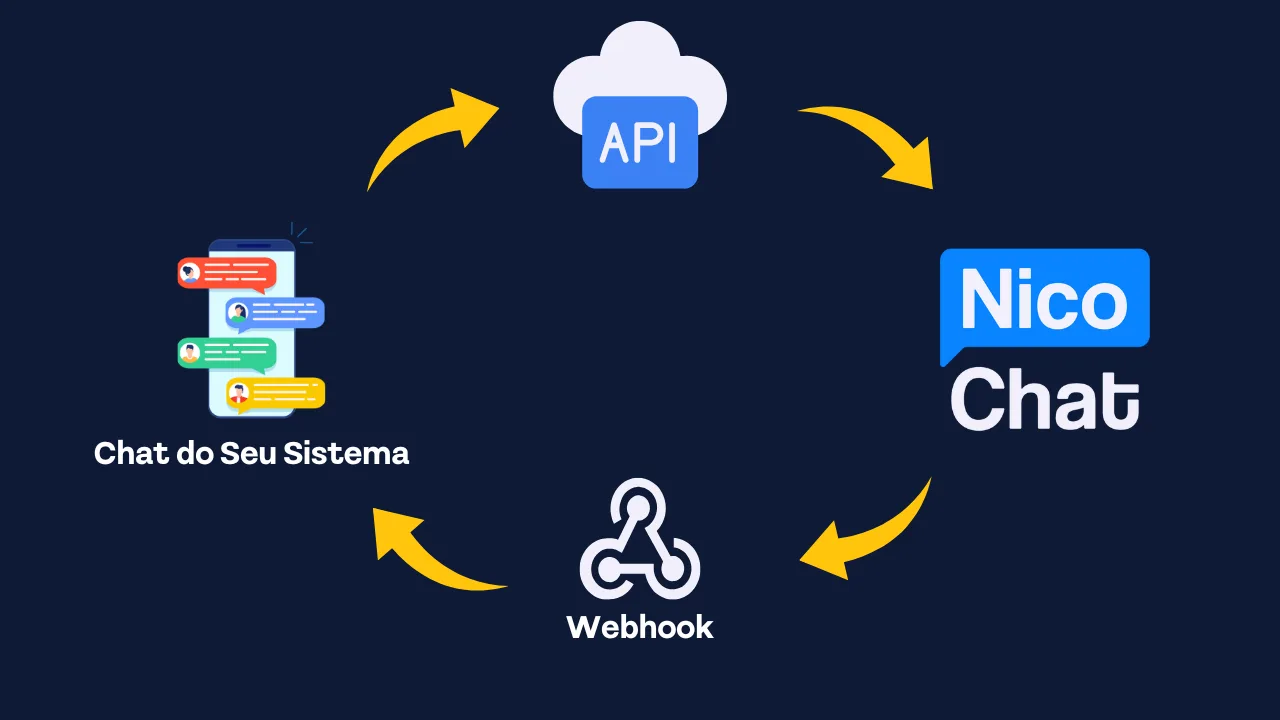
Esse complemento exige um setup de valor único, que libera uma chave de API para autenticar o cadastro de webhooks em qualquer número de workspaces. Cada sistema a ser integrado exige um setup próprio. O valor vigente é informado pelo suporte na contratação. Exemplos:
- Se você quiser integrar um sistema a diversas workspaces, haverá apenas uma cobrança de setup.
- Se você tiver 2 sistemas para integrar, serão 2 cobranças de setup, independentemente do número de workspaces.
O Link de Pagamento do setup é o seguinte: https://buy.stripe.com/6oE3fgexL3mEb6g00i
- Habilitar o complemento de parceiro com o Suporte do NicoChat, Api Chat. Será fornecida uma chave API para configurar o Webhook. A autenticação será por Bearer Auth.
- Configurar o webhook da Api Chat para a workspace através da API oferecida pelo suporte. A URL do webhook precisa ser verificada.
- O bot_url, retornado na resposta da configuração do webhook da Api Chat, será usado para enviar mensagens do contato.
- Verifique o payload de exemplo para diferentes tipos de mensagens.
- Quando o fluxo ou o agente responder, o payload da mensagem será enviado para a URL do webhook da Api Chat fornecida, com uma assinatura incluída no cabeçalho.
Você receberá uma Chave API para fazer as requisições de registro de webhook.
POST {{baseUrl}}?action=get-webhookCorpo da requisição:
{
    "ChaveApi": "{{Chave API do NicoChat}}"
}
Exemplo de resposta:
{
    "status": "ok",
    "data": {
        "webhook_url": "https://your-webhook-url/",
        "webhook_verification_key": "VERIFICATION_TOKEN",
        "webhook_status": "verified",
        "bot_url": "https://bot.dfktv2.com/api/apichat/{{unique_code_to_bot}}"
    }
}POST {{baseUrl}}?action=set-webhookCorpo da requisição:
{
    "ChaveApi": "{{Chave API do NicoChat}}",
    "webhook_url": "https://your-webhook-url/",
    "webhook_verification_key": "VERIFICATION_TOKEN"
}hub_mode: O valor será “subscribe”hub_verify_token: O valor será o mesmo fornecido no corpo da sua requisição como "webhook_verification_key", o exemplo acima foi VERIFICATION_TOKENhub_challenge: O valor será uma string aleatória, por exemplo: 205c40409f9bcdeb9e00614b442c5fddVocê precisa verificar a chave de verificação e retornar a resposta com o conteúdo do parâmetro
hub_challenge no corpo da resposta. Exemplo: 205c40409f9bcdeb9e00614b442c5fdd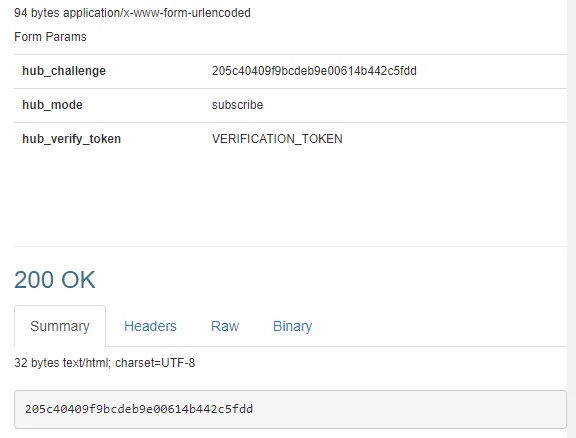
Exemplo de resposta (sucesso):
{
    "status": "ok",
    "data": {
        "webhook_url": "https://your-webhook-url/",
        "webhook_verification_key": "VERIFICATION_TOKEN",
        "webhook_status": "verified",
        "bot_url": "https://bot.dfktv2.com/api/apichat/{{unique_code_to_bot}}"
    }
}POST {{baseUrl}}?action=delete-webhookCorpo da requisição:
{
    "ChaveApi": "{{Chave API do NicoChat}}"
}
Exemplo de resposta (sucesso):
{
    "status": "ok",
    "data": {
        "webhook_url": "",
        "webhook_verification_key": "",
        "webhook_status": "",
        "bot_url": ""
    }
}Você precisa usar a Chave API do seu fluxo para autenticação, o que requer a permissão Gerenciar Fluxo.
POST https://bot.dfktv2.com/api/apichat/{{unique_code_to_bot}}Corpo da requisição:
{
    "content": "{{TEXT MESSAGE}}",
    "message_type": "incoming",
    "sender": {
        "id": "{{UNIQUE BOT USER ID}}",
        "name": "{{BOT USER NAME}}",
        "email": "",
        "phone_number": "",
        "type": "contact"
    },
    "conversation_id": 123,
    "event": "message_created"
}POST https://bot.dfktv2.com/api/apichat/{{unique_code_to_bot}}Corpo da requisição:
{
    "content": "{{BUTTON TITLE}}",
    "message_type": "incoming",
    "sender": {
        "id": "{{UNIQUE BOT USER ID}}",
        "name": "{{BOT USER NAME}}",
        "email": "",
        "phone_number": "",
        "type": "contact"
    },
    "conversation_id": 123,
    "event": "message_postback",
    "submitted_values": [
        {
            "title": "{{BUTTON TITLE}}",
            "payload": "{{BUTTON PAYLOAD}}"
        }
    ]
}POST https://bot.dfktv2.com/api/apichat/{{unique_code_to_bot}}Corpo da requisição:
{
    "content": "",
    "message_type": "incoming",
    "sender": {
        "id": "{{UNIQUE BOT USER ID}}",
        "name": "{{BOT USER NAME}}",
        "email": "",
        "phone_number": "",
        "type": "contact"
    },
    "conversation_id": 123,
    "event": "message_created",
    "attachments": [
        {
            "file_type": "image",
            "data_url": "{{IMAGE URL}}"
        }
    ]
}POST https://bot.dfktv2.com/api/apichat/{{unique_code_to_bot}}Corpo da requisição:
{
    "content": "",
    "message_type": "incoming",
    "sender": {
        "id": "{{UNIQUE BOT USER ID}}",
        "name": "{{BOT USER NAME}}",
        "email": "",
        "phone_number": "",
        "type": "contact"
    },
    "conversation_id": 123,
    "event": "message_created",
    "attachments": [
        {
            "file_type": "audio",
            "data_url": "{{AUDIO URL}}"
        }
    ]
}POST https://bot.dfktv2.com/api/apichat/{{unique_code_to_bot}}Corpo da requisição:
{
    "content": "",
    "message_type": "incoming",
    "sender": {
        "id": "{{UNIQUE BOT USER ID}}",
        "name": "{{BOT USER NAME}}",
        "email": "",
        "phone_number": "",
        "type": "contact"
    },
    "conversation_id": 123,
    "event": "message_created",
    "attachments": [
        {
            "file_type": "video",
            "data_url": "{{VIDEO URL}}"
        }
    ]
}POST https://bot.dfktv2.com/api/apichat/{{unique_code_to_bot}}Corpo da requisição:
{
    "content": "",
    "message_type": "incoming",
    "sender": {
        "id": "{{UNIQUE BOT USER ID}}",
        "name": "{{BOT USER NAME}}",
        "email": "",
        "phone_number": "",
        "type": "contact"
    },
    "conversation_id": 123,
    "event": "message_created",
    "attachments": [
        {
            "file_type": "file",
            "data_url": "{{FILE URL}}"
        }
    ]
}Quando o fluxo ou o agente envia uma mensagem, a URL do seu webhook recebe o payload da mensagem. Para cada requisição, você pode verificar os seguintes headers.
X-Hub-Signature-256: this is used to verify the payload
x-flow-ns: this is the flow ns for your bot
x-action: this is the webhook action type, the value is "messages"
Código PHP de exemplo para verificar a assinatura do payload.
$payload = request()->body();
$verification_key = "{{VERIFICATION_TOKEN}}";
$sign = 'sha256='.hash_hmac('sha256', $payload, $verification_key);
//you need to check the header signature value is matched
request()->header('X-Hub-Signature-256') == $sign{
"sender_id": "{{UNIQUE BOT USER ID}}",
"conv_id": 123,
"text": "{{TEXT MESSAGE}}",
"type": "text",
"message_type": "outgoing",
"private": false
}{
"sender_id": "{{UNIQUE BOT USER ID}}",
"conv_id": 123,
"text": "{{TEXT MESSAGE}}",
"type": "text",
"message_type": "outgoing",
"private": false,
"content_type": "button_template",
"content_attributes": {
"text": "{{TEXT MESSAGE}}",
"buttons": [
{
"type": "postback",
"title": "{{BUTTON TITLE}}",
"payload": "{{BUTTON PAYLOAD}}"
},{
"type": "postback",
"title": "{{BUTTON TITLE}}",
"payload": "{{BUTTON PAYLOAD}}"
}
]
}
}{
"sender_id": "{{UNIQUE BOT USER ID}}",
"conv_id": 123,
"text": "{{TEXT MESSAGE}}",
"type": "text",
"message_type": "outgoing",
"private": false,
"content_type": "generic_template",
"content_attributes": {
"ratio": "horizontal",
"items": [
{
"title": "{{TITLE}}",
"image_url": "{{IMAGE URL}}",
"item_url": null,
"subtitle": "{{SUBTITLE}}",
"default_action": null,
"buttons": [
{
"type": "postback",
"title": "{{BUTTON TITLE}}",
"payload": "{{BUTTON PAYLOAD}}"
}
]
},
{
"title": "{{TITLE}}",
"image_url": "{{IMAGE URL}}",
"item_url": null,
"subtitle": "{{SUBTITLE}}",
"default_action": null,
"buttons": [
{
"type": "postback",
"title": "{{BUTTON TITLE}}",
"payload": "{{BUTTON PAYLOAD}}"
}
]
}
]
}
}{
"sender_id": "{{UNIQUE BOT USER ID}}",
"conv_id": 123,
"url": "{{IMAGE URL}}",
"type": "image",
"message_type": "outgoing",
"private": false
}{
"sender_id": "{{UNIQUE BOT USER ID}}",
"conv_id": 123,
"url": "{{AUDIO URL}}",
"type": "audio",
"message_type": "outgoing",
"private": false
}{
"sender_id": "{{UNIQUE BOT USER ID}}",
"conv_id": 123,
"url": "{{VIDEO URL}}",
"type": "video",
"message_type": "outgoing",
"private": false
}{
"sender_id": "{{UNIQUE BOT USER ID}}",
"conv_id": 123,
"url": "{{FILE URL}}",
"type": "file",
"message_type": "outgoing",
"private": false
}