NicoChatNicoChatDocsSearch the docs…
Sign in

Audit Logs

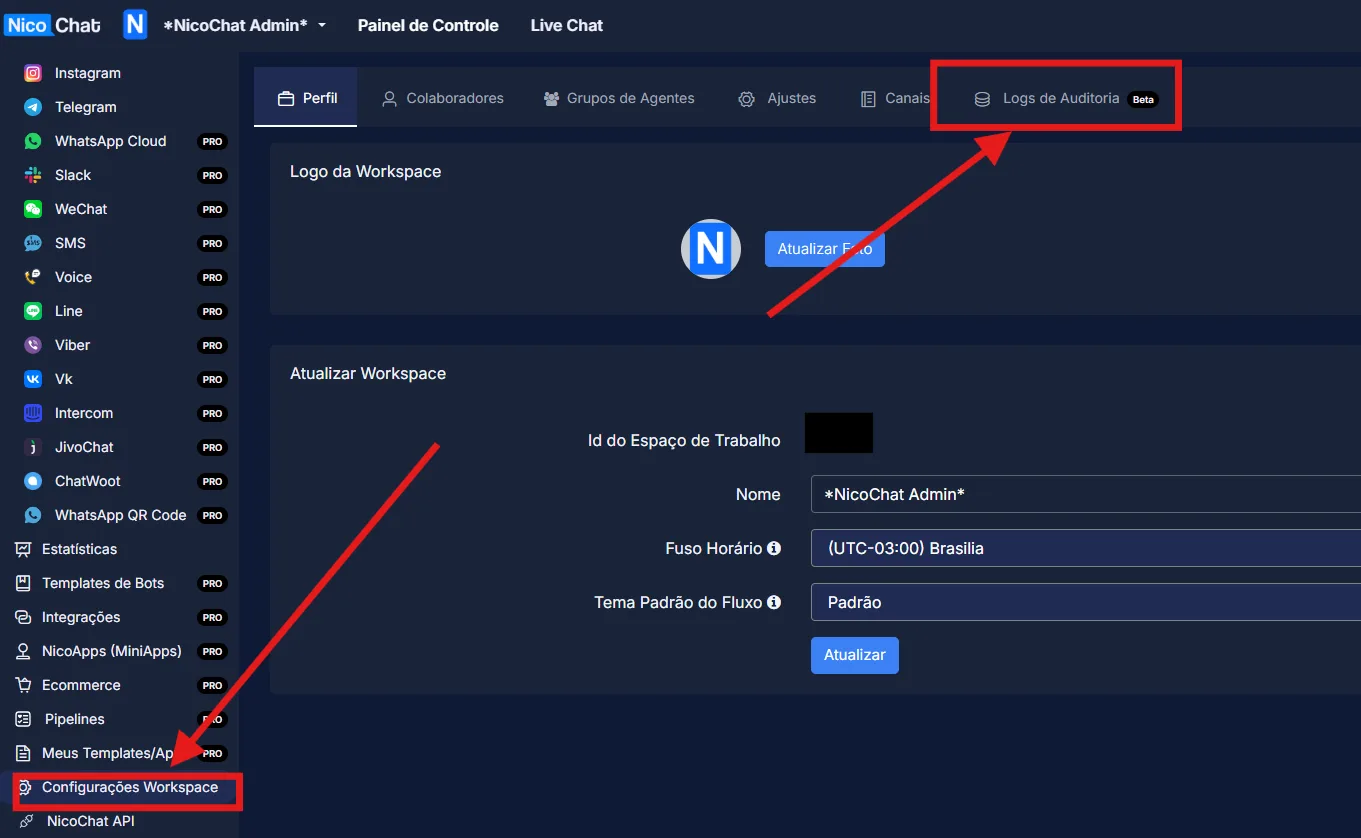
Audit logs allow users to keep track of the changes happening across their workspace. The information includes which team members switched workspaces, which flows were changed, which nodes were deleted or created and who made the changes.

2026-08-12
Attention
Please note that these settings are only available to the owner and the admin of the workspace.

Audit logs allow users to keep track of the changes happening across their workspace. The information includes which team members switched workspaces, which flows were changed, which nodes were deleted or created and who made the changes.

Audit logs provide a comprehensive analysis of the activity happening across workspaces and add an extra layer of security and accountability for whoever manages a team.

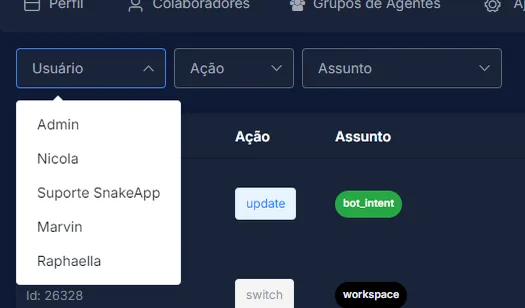
You can use the filters at the top left of the interface to filter by user, action and subject, and thus monitor specific changes happening in a flow or within the workspace.

Actions List

Action
Explanation
create
This action means that a node is being created, such as an action node to perform an action or a Message node to send a message.
delete
This means that something was deleted. It can be a node, a trigger or a CUF.
install
This means that a template or a NicoApp was installed on the channel.
link
This means that an integration was linked to the workspace. An example is an SMTP connection or an integration with OpenAI.
login
This means that a user logged in to the workspace.
logout
This means that a user logged out of the workspace.
switch
This means that a user switched from one workspace to another.
system
This means that there was an action in the system.
uninstall
This means that a NicoApp was uninstalled from the workspace.
unlink
This means that an integration was unlinked from the workspace.
update
This means that a node was updated. An example is updating the text of a Message node.

Subjects List

Action
Explanation
create
This means that a node is being created, such as an action node to perform an action or a Message node to send a message.
delete
This means that something was deleted. It can be a node, a trigger or a CUF.
install
This means that a template or a NicoApp was installed on the channel.
link
This means that an integration was linked to the workspace. An example is an SMTP connection or an integration with OpenAI.
login
This means that a user logged in to the workspace.
logout
This means that a user logged out of the workspace.
switch
This means that a user switched from one workspace to another.
system
This means that there was an action in the system.
uninstall
This means that a NicoApp was uninstalled from the workspace.
unlink
This means that an integration was unlinked from the workspace.
update
This means that a node was updated, such as updating the text of a Message node.

Subjects List

Subject
Explanation
addon
Indicates when an add-on is added.
agent_segment
Segment used by agents in the global search.
board
Indicates a change in the Kanban Board.
board_column
Indicates a change in the Kanban Board column.
bot
Indicates a change in the channel.
bot_action
Indicates a change in the channel action.
bot_addon
Indicates a change in the channel add-on.
bot_comment
Automation -> Comment keyword.
bot_event
Contents -> Custom Event.
bot_fb_ads
Indicates a change in the Facebook Ads Payload.
bot_fb_feedback
Contents -> Customer Feedback.
bot_fb_lead_form
Indicates a change in the Facebook Lead Form.
bot_field
Indicates a change in the channel field.
bot_intent
Automation -> Intents.
bot_keyword
Automation -> Keywords.
bot_lang
Indicates a change in the channel language.
bot_menu
Indicates a change in the channel menu.
bot_message
Message node.
bot_node
Indicates a change in the channel node.
bot_question
Question node.
bot_report
Tools -> Custom Report.
bot_segment
Contacts -> Segment.
bot_sequence
Automation -> Sequence.
bot_shortcut
Tools -> Shortcut.
bot_tag
Indicates a change in the channel tag.
bot_template
Enables logs for template-related actions, such as creation, deletion and updates.
bot_template_install
Updates to installed templates, such as edit and view permissions, disabling auto update, etc.
bot_template_link
To generate a one-time link.
bot_tester
Tools -> Tester.
bot_trigger
Automation -> Trigger.
bot_user
Contact.
bot_widget
Tools -> Widget.
broadcast
Indicates that a Broadcast was sent.
calendly
Integration -> Calendly.
change email
Indicates an email change.
chatwood
Bot -> Chatwood.
chatwood_agent
Integration -> Chatwood Agent.
Claude
Integration -> Claude.
Closing note
Bot -> Contents -> Final Notes.
Cloudinary
Indicates a connection with Cloudinary.
crm_v1
Integration -> GoHighLevel V1.
custom menu
Partner -> Custom Menu.
data_store
Data Store actions (rows and records) in storages such as MySQL.
discount_code
E-Commerce -> Discount Code.
email_template
My Contents -> Email Template.