

Agent Analytics
The NicoChat Agent Analytics page provides a detailed view of the performance of each agent managing your channels. This documentation describes the key metrics, visualizations, and use cases available on the Agent Analytics page.
Overview
The Agent Analytics page is divided into sections that highlight agent performance over the selected timeframe (for example, the last 7 days). It includes both summary and detailed views to help you monitor and optimize agent productivity and efficiency.
Key metrics and visualizations
Agent Performance summary:
Top agent highlight: this section lists the metrics of the top-performing agents.
- Messages Sent: total number of messages sent by the agent.
- Average First Response Time: average time taken by the agent to respond to the first message.
- Assigned conversations: number of conversations assigned to the agent.
- Done conversations: number of conversations marked as done by the agent.
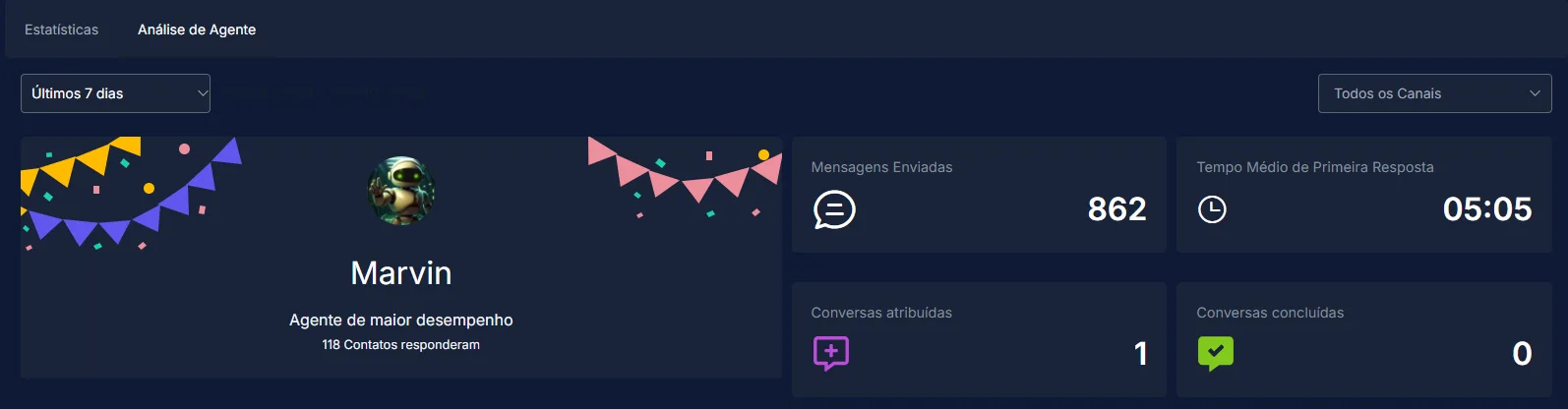
Detailed agent performance table: this table lists agents individually, along with various performance metrics. The columns are:
Member: the agent's name and avatar.
Messages Sent: total messages sent by the agent.
Notes: number of notes added by the agent.
Contacts responded: number of contacts that received a reply from the agent.
Assigned: number of conversations assigned to the agent.
Done: number of conversations marked as done by the agent.
Average First Response Time: average time taken by the agent to respond to the first message.
Average Resolution Time: average time taken by the agent to resolve conversations.

Messages Sent: total number of messages sent by your agents on each day.
Contacts responded: number of unique contacts that interacted with your agents.
Private notes: the number of notes the agent has added.
Assigned conversations: the number of conversations assigned to the agent.
Done conversations: the number of conversations the agent has marked as done. It indicates the agent's efficiency in resolving conversations.
Messages Sent: the total number of messages the agent has sent. This metric indicates the agent's activity level in communication.
Contacts responded: the number of unique contacts the agent has replied to. This metric shows the breadth of the agent's engagement with different contacts.
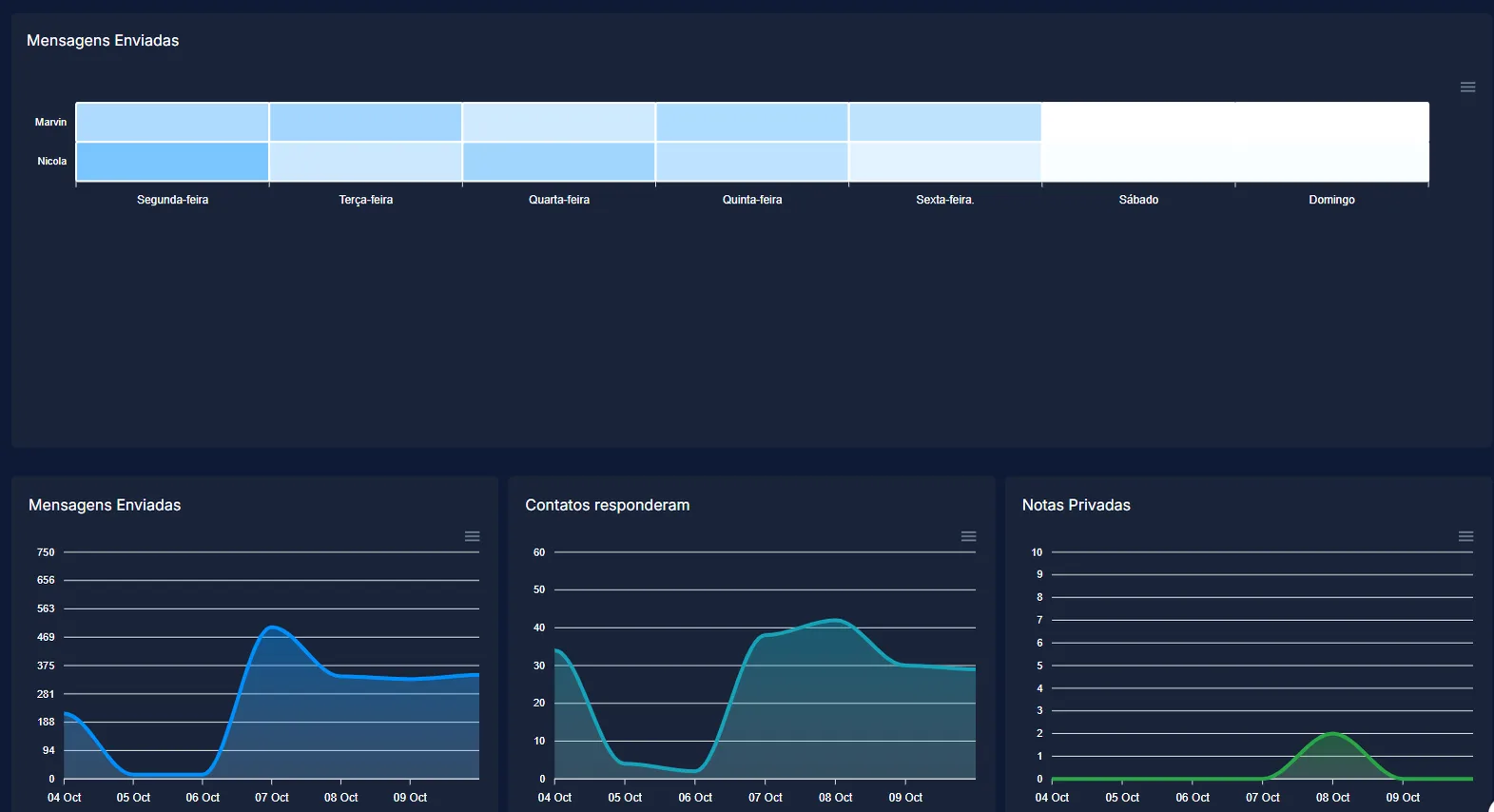
Conversations:
- Assigned conversations: this metric tracks the number of conversations that have been assigned to agents.
- Done conversations: this metric tracks the number of conversations that have been marked as done by agents.

Average First Response Time and Average Resolution Time:
- Average First Response Time: this metric tracks the average time taken by agents to respond to the first message in a conversation.
- Average Resolution Time: this metric tracks the average time taken by agents to resolve a conversation from the first message until the moment it is marked as done.
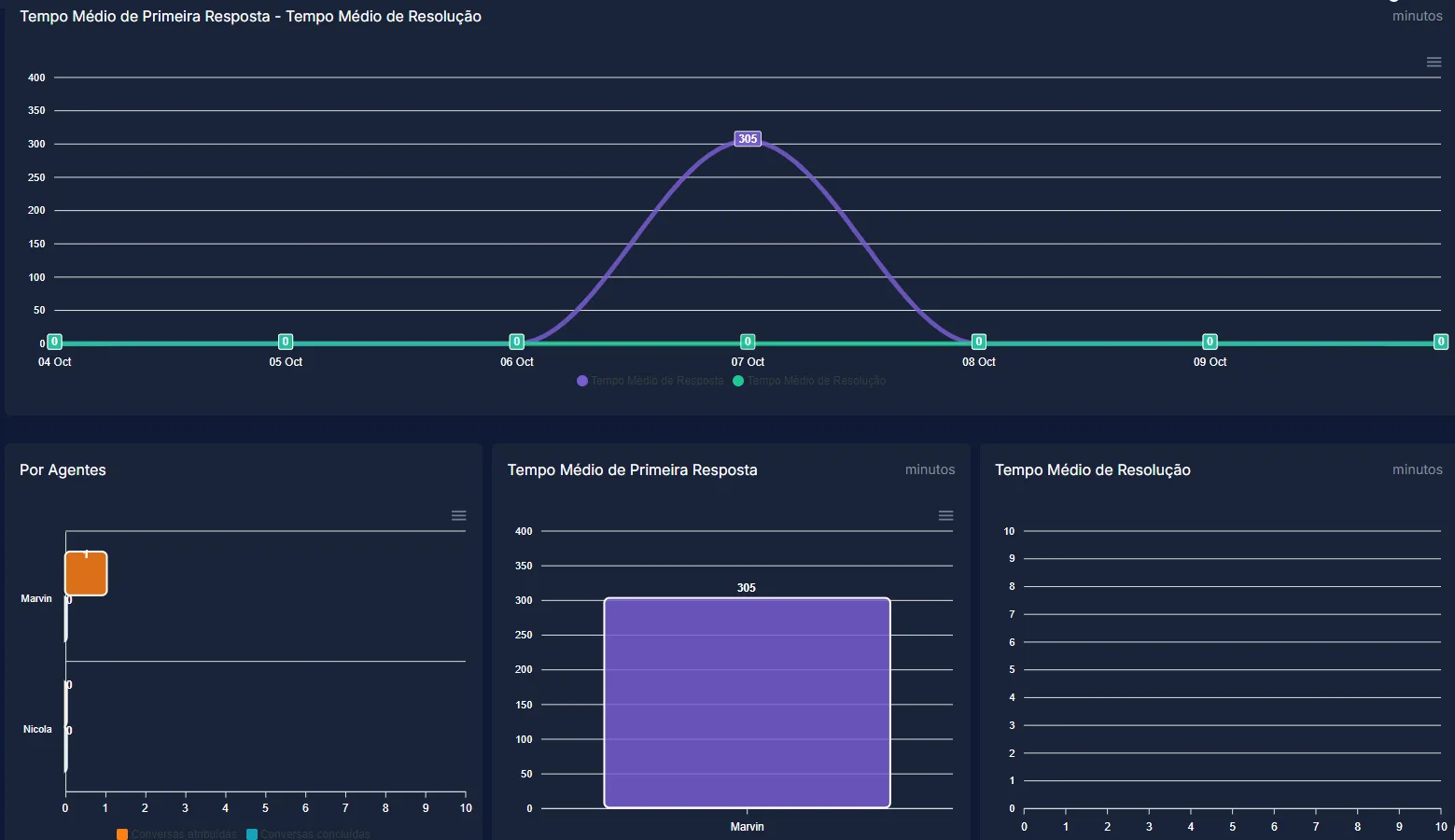
By Agents:
- Assigned conversations: this metric tracks the number of conversations that have been assigned to each agent.
- Done conversations: this metric tracks the number of conversations that have been marked as done by each agent.
Average First Response Time: this metric tracks the average time agents take to respond to the first message in a conversation. It is measured in minutes.
Average Resolution Time: this metric tracks the average time agents take to resolve a conversation, from the first message until the moment it is marked as done. It is measured in minutes.
Use cases:
Monitor agent performance: track key metrics such as messages sent, response times, and resolved conversations to evaluate and improve agent performance.
Identify top performers: recognize and reward agents who demonstrate exceptional performance, as highlighted in the top agent summary.
Optimize response times: analyze average response and resolution times to ensure timely support and increase customer satisfaction.
Workload distribution: assess the distribution of assigned and done conversations to manage agent workload effectively and avoid burnout.
Performance reviews: use the detailed metrics during agent reviews to give specific feedback and set improvement goals.