NicoChatNicoChatDocsSearch the docs…
Sign in

Trinks

Trinks is the NicoApp for integrating with the Trinks scheduling platform, used by beauty salons, barbershops and aesthetic clinics. With it, your flow creates, edits, looks up and cancels appointments.

2026-08-12
Note
Available in the NicoApps tab. Basis of the integration: the official Trinks API (api.trinks.com), documented at trinks.readme.io.

Authentication

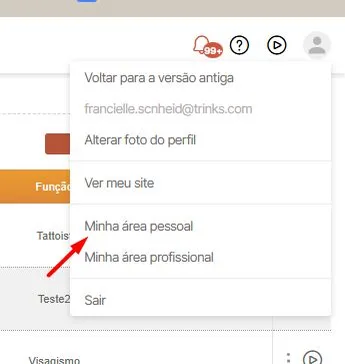
  • Go to “Minha área pessoal”
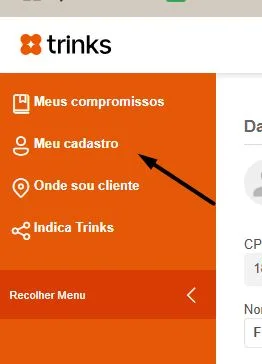
  • Go to “Meu Cadastro”
  • Access your Trinks registration through this link (login required).
  • Go to the Token de API Pessoal section and click Gerar token.

  • Copy the token shown and enter it in the NicoApp’s Token (X-Api-Key) field.

Besides the token, the app also requires the estabelecimentoId header — the ID of the Trinks business this token has access to. Without it, Trinks rejects the request even with a valid token.

Note
How to get the estabelecimentoId: with the token already generated, call GET https://api.trinks.com/v1/estabelecimentos (X-Api-Key header with the token) — this endpoint lists every business the token has access to. Take the id field of the desired business from the response and enter it in the estabelecimentoId field when installing the NicoApp. If the token has access to a single business (the most common case), it will be the only item in the list.
Attention
Both fields — Token (X-Api-Key) and estabelecimentoId — are required in every API call. If an action fails with an authorization / business-not-found error, check both values in the app’s configuration.

Request Limits

The Trinks API has per-minute and per-month request limits, applied per API key (token).

Per minute: 60 requests
Per month: 5000 requests

When either of the two limits is exceeded, Trinks responds with HTTP 429 (Too Many Requests) until the window is renewed (the next minute or the next month). The documentation does not indicate different limits per contracted plan — for larger volumes, you need to negotiate directly with Trinks support.

Note
Save requests: avoid querying the catalog (services/professionals) on every message — this data rarely changes; store the IDs in bot variables whenever possible.

What the NicoApp does

The app has 20 actions, organized into 6 groups. All of them use Basic/API Key (X-Api-Key + estabelecimentoId) and, when Trinks rejects the operation, return the API’s actual error message through the block’s error path.

Appointments

Action
What it does
Endpoint
Main inputs
Outputs
Create Appointment
Creates a new service appointment with a professional
POST /v1/agendamentos/
Service ID, Client ID, Professional ID, Duration (min), Value, Start Date/Time
Appointment ID
Edit Appointment
Updates the data of an existing appointment
PUT /v1/agendamentos/{id}
Appointment ID + the same fields as Create, plus Notes
Appointment ID
Edit Status
Changes the status of an appointment (e.g.: confirmed, attended)
PATCH /v1/agendamentos/{id}/status/{status}
Appointment ID, Status + the same appointment data
Appointment ID
Cancel Appointment
Cancels an appointment (dedicated endpoint, status "cancelado")
PATCH /v1/agendamentos/{id}/status/cancelado
Appointment ID; Reason and Cancelled By (fixed in the flow)
Cancellation confirmation
Get schedule
Lists or looks up a client’s appointments within a period
GET /v1/agendamentos
Client ID, Start Date, End Date, page size (all optional)
Appointments Found (JSON)
List schedules
Lists the professionals’ times on a date, filtering by service/professional
GET /v1/agendamentos/profissionais/{data}
Date (required); Service ID, Professional ID (optional)
Times Found (JSON), Total Found

Clients

Action
What it does
Endpoint
Main inputs
Outputs
List Clients
Searches for clients by name, CPF, e-mail or phone
GET /v1/clientes
Name, CPF, E-mail, Phone (at least one)
Clients Found (JSON, with phone numbers and details of the 1st result)
Create Client
Registers a new client in Trinks
POST /v1/clientes
Name (required); E-mail, CPF, Gender, Notes, External Code, Phone
Client ID
Update Client
Updates the data of an existing client
PUT /v1/clientes/{id}
Client ID + fields to update (only the filled-in ones are sent)
Client ID
Delete Client
Removes a client from the records
DELETE /v1/clientes/{id}
Client ID

Client Labels

Action
What it does
Endpoint
Main inputs
Outputs
Add Client Label
Links a label to a client
POST /v1/clientes/{id}/etiquetas/{etiquetaId}
Client ID, Label ID
Remove Client Label
Removes a label from a client
DELETE /v1/clientes/{id}/etiquetas/{etiquetaId}
Client ID, Label ID
Get Client Labels
Lists the labels linked to a client
GET /v1/clientes/{id}/etiquetas
Client ID
Labels Found (JSON)

Client Phones

Action
What it does
Endpoint
Main inputs
Outputs
Add client phone
Adds a phone number to the client’s record (splits area code/number automatically)
POST /v1/clientes/{id}/telefones
Client ID, Full phone number, Phone Type
Client ID
Get client phones
Lists a client’s registered phone numbers
GET /v1/clientes/{id}/telefones
Client ID
Phones Found (JSON)
Delete client phone
Removes a phone number from the client’s record
DELETE /v1/clientes/{id}/telefones/{telefoneId}
Client ID, Phone ID

Credits and Gift Cards

Action
What it does
Endpoint
Main inputs
Outputs
Add a client credit
Posts a credit to the client’s account
POST /v1/clientes/{id}/creditos
Client ID, Value, Payment Method
Confirmation
Add gift card to a client
Generates a gift card for the client
POST /v1/clientes/{id}/valespresentes
Client ID, Value, Payment Method, Card number, Expiry date
Confirmation

Catalog

Action
What it does
Endpoint
Main inputs
Outputs
List Services
Lists the services registered for the business, with automatic pagination
GET /v1/servicos
Name, Category (optional)
Services Found (JSON: id, name, description, category, duration, price)
List Professionals
Lists the professionals of the business, with automatic pagination
GET /v1/profissionais
Name, Category (optional)
Professionals Found (JSON)

Tips and notes

  • Automatic pagination: List Services and List Professionals already go through all of Trinks’ pages on their own (internal loop over page/totalPages), so you receive the complete list in a single call to the action.
  • Full phone number in a single field: in the phone fields (Create Client, Add client phone), enter the full phone number with the area code — the app splits area code and number automatically (removing country code 55 when present).
  • Chained IDs: the Client ID comes from Create/List Clients and feeds virtually every client action (labels, phones, credit, gift card, appointment). The Appointment ID comes from Create Appointment and feeds Edit, Edit Status and Cancel.
  • Error handling: when Trinks rejects an operation (invalid data, insufficient permission, request limit reached), the action fails and returns Trinks’ actual error message — use the block’s error path to handle it in the flow.
  • Appointment status: the values accepted by Edit Status (and the fixed "cancelado" status used by Cancel Appointment) follow the codes defined by Trinks — confirm the valid values in Trinks’ reference documentation before using them in production.
  • Save requests: with the limit of 60/min and 5000/month per token, avoid querying the catalog (services/professionals) on every message — store the IDs in bot variables whenever possible.