

Paypal - MCP
Here is the complete documentation to integrate the PayPal MCP Server with NicoChat, already with the correct URL and authentication:
The PayPal MCP Server lets NicoChat interact directly with your PayPal account using natural language commands.
Through this integration, your AI can:
- Create invoices
- List transactions
- Generate reports
- Process refunds
- Manage subscriptions
- And other business operations (developer.paypal.com, apidog.com)
The default URL of PayPal's MCP endpoint is:
texto
https://mcp.paypal.com/sseIt is a public URL, with authentication done via Bearer Token.
Authentication is by Bearer Token, using a PayPal Access Token.
To obtain it:
- Go to the PayPal Developer Dashboard.
- Open REST API Apps and create or select an app (Sandbox or Production).
- Copy the Client ID and the Secret, and generate the Access Token via OAuth.
- The token will be used as the Bearer in the configuration.
- In NicoChat's side menu, go to:
texto
Centro de IA → Servidores MCP → Adicionar Servidor MCP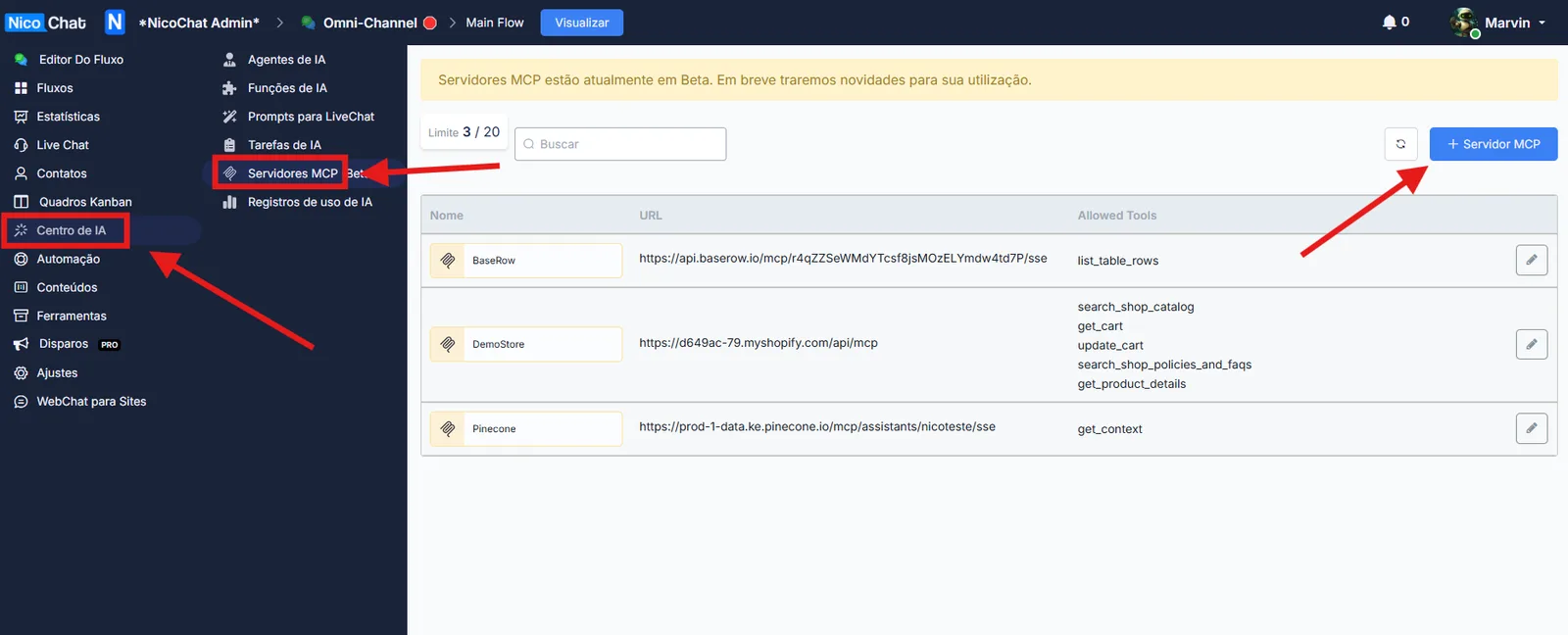
- Fill in the fields:
Field
Value
Name
Example:
PayPalURL
https://mcp.paypal.com/sseAuthentication
Bearer Token
Access Token
Paste the Access Token from your PayPal app
- Click List Tools to load the available functions of the PayPal MCP Server.
- Select only the ones you really want to enable (e.g.:
create_invoice,listTransactions,refund_create,update_subscriptionetc.). (developer.paypal.com, github.com, developer.paypal.com, developer.paypal.com)
- Enable only the tools you need for your flow, to avoid the risk of misuse.
- Fewer tools = lower token consumption + more security.
- Pay attention to sensitive operations, such as creating invoices, refunds or managing subscriptions.
📌 Learn more about how to set this up in your flow at:
👉 MCP Servers
If you want, I can continue with integrations for systems such as Supabase, Asana or another one. Shall I go on?