

OpenAI & ChatGPT
Open AI is an AI tool just like Dialogflow that lets users interact using AI. From replying to users to generating images, you can use OpenAI for a variety of tasks.
Integrating OpenAI's ChatGPT with NicoChat can offer numerous benefits to businesses looking to engage with their customers across various channels.
With all the channels NicoChat offers — Messenger, Instagram, WhatsApp, Google Business Messenger, Voice, SMS, Viber, Line, VK, web chat, WeChat and many more — connected to ChatGPT, you can offer businesses AI-powered conversational capabilities that can understand and respond to customer queries in a human-like manner, improving the customer experience and increasing engagement.
ChatGPT's advanced natural language understanding and generation capabilities enable our chatbot to understand the context of the conversation and offer personalized responses that are relevant to customer queries.
Combined with our multichannel capabilities, these responses let businesses engage with their customers across the communication channels they prefer, improving the overall experience. The result is higher customer satisfaction, greater engagement and simpler customer support — all of which can help businesses grow and succeed.
NicoChat offers native integration with OpenAI, which lets users set up complex flows with just one click.
Let's first see how to establish the connection between OpenAI and NicoChat.
Visit
Log in using your credentials.
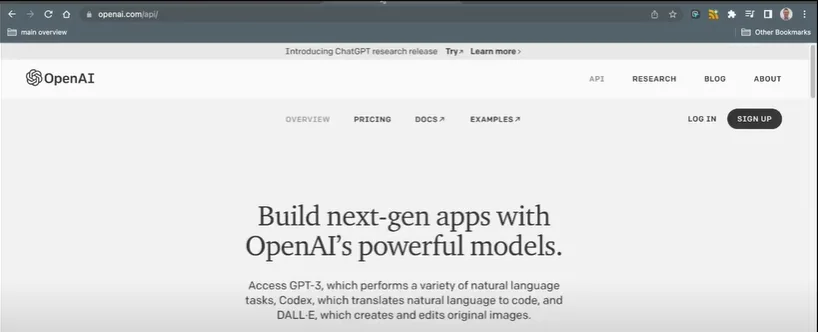
Click the top-right corner, on the “Personal” tab.
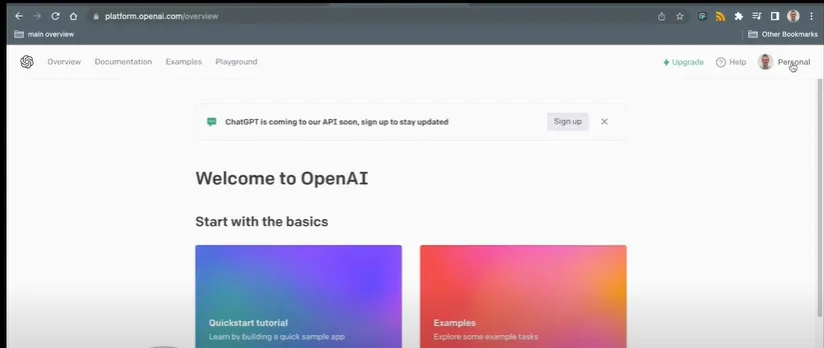
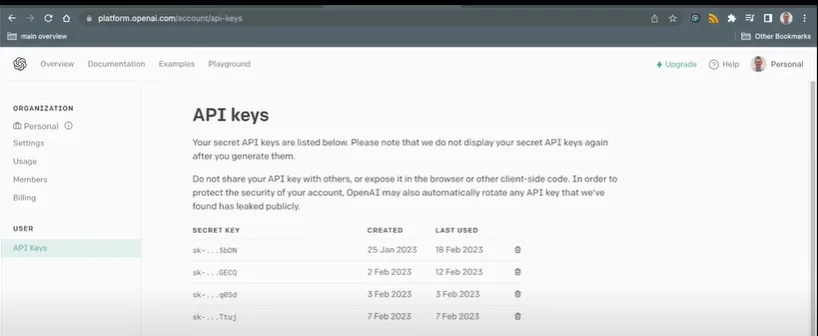
From here, you will be able to generate an API key.
Paste your API Key into NicoChat and click “Save” to establish the connection.
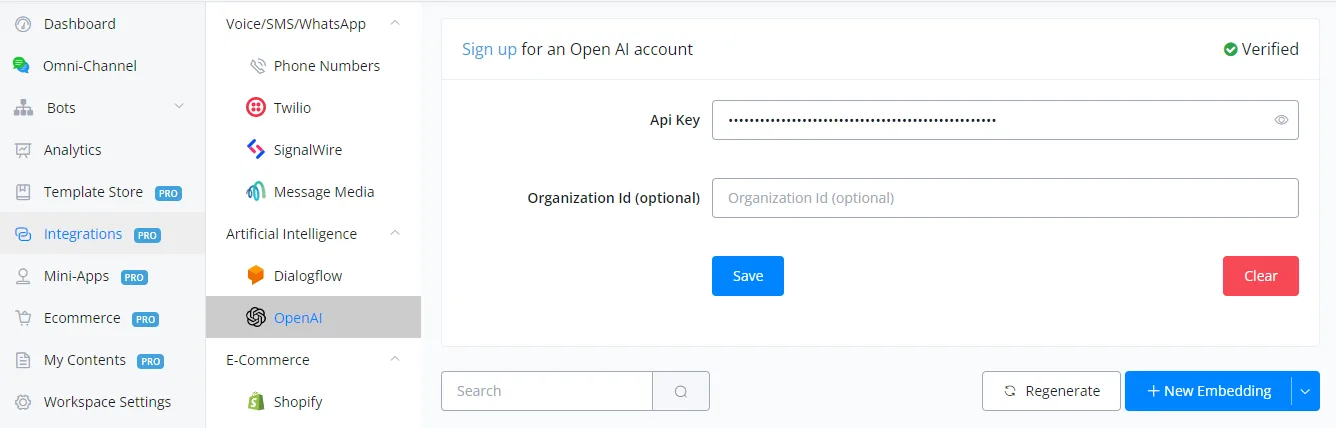
Your account has been successfully connected to NicoChat.
NicoChat offers many actions with OpenAI that users can use according to their needs.
Let's go through them in detail, one by one.
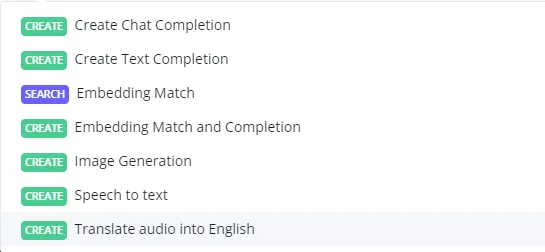
Text completion lets you send prompts to OpenAI in text form and receive an answer based on that prompt.
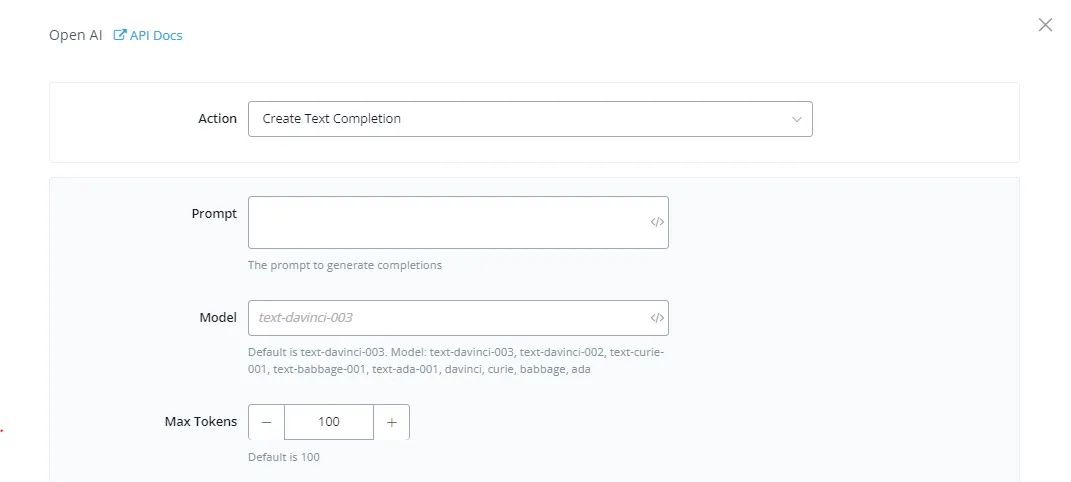
Prompt: this is the main input you want the AI to give an answer or output for. It can be a question, an instruction, etc.
Model: the model you want to use inside OpenAI for the task. By default, text-DaVinci-003 is selected.
Max Tokens: each task inside OpenAI consumes tokens. These tokens can be replenished with credit. This field limits the maximum number of tokens you want to use for a particular task.
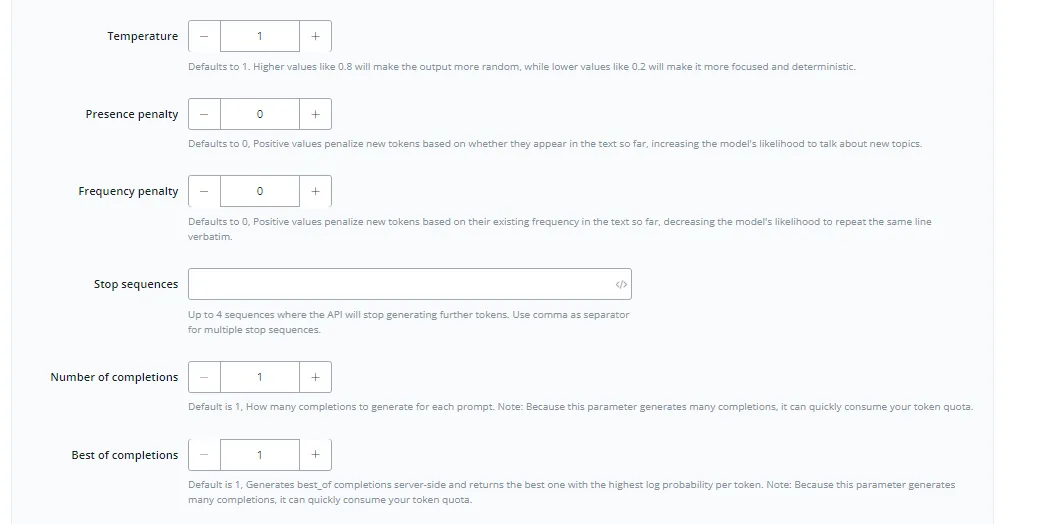
Temperature: this acts as an accuracy gauge, where higher values give more random answers and lower values give more deterministic and focused answers. The default is 1
Presence penalty: this value makes OpenAI use unique phrases and texts when completing a task. The higher the value, the less repetitive the words. The default is 0.
Number of completions: the number of times you want the AI to generate a response based on your prompt. The higher the value, the more responses. The default is 1, to avoid consuming tokens.
Best of completions: returns the best possible responses for your prompt. The default is 1. It works together with the Number of completions field to choose the best possible answer from a group of responses.
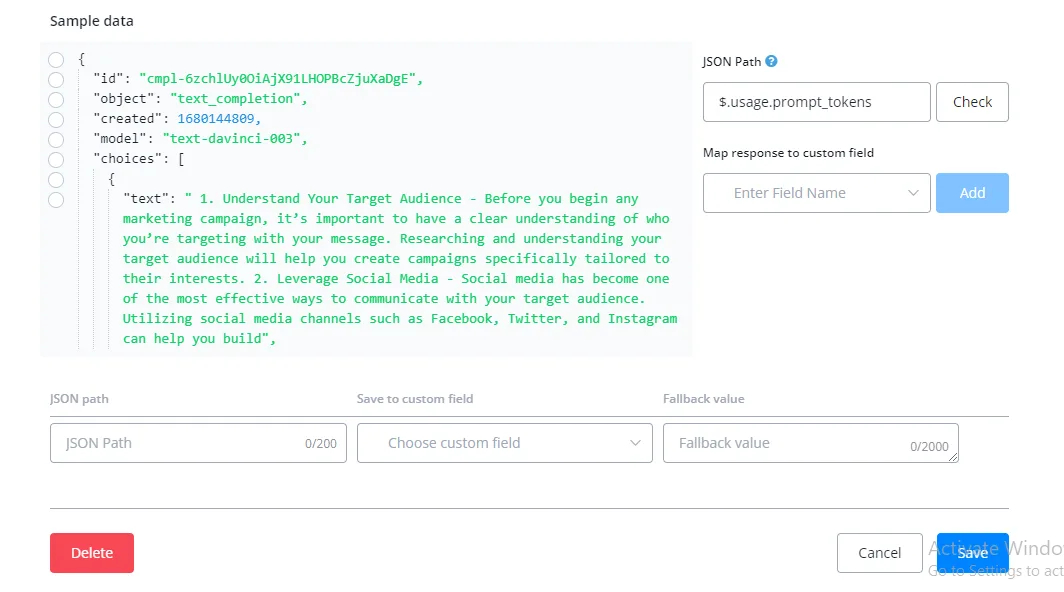
You can select the text within the options and see the selected JSON path. Then save the response into a user custom field and use that response in your flow builder.
{
"id": "cmpl-6zchlUy0OiAjX91LHOPBcZjuXaDgE",
"object": "text_completion",
"created": 1680144809,
"model": "text-davinci-003",
"choices": [
{
"text": " 1. Understand Your Target Audience - Before you begin any marketing campaign, it’s important to have a clear understanding of who you’re targeting with your message. Researching and understanding your target audience will help you create campaigns specifically tailored to their interests. 2. Leverage Social Media - Social media has become one of the most effective ways to communicate with your target audience. Utilizing social media channels such as Facebook, Twitter, and Instagram can help you build",
"index": 0,
"logprobs": null,
"finish_reason": "length"
}
],
"usage": {
"prompt_tokens": 4,
"completion_tokens": 100,
"total_tokens": 104
}
}
Id: the id of the text completion. A unique value.
Object: the action/task you gave to OpenAI. In our case, “text_completion”.
Created: a date and time field that tells the moment the response was created. It is in Unix timestamp format.
Finish reason: the reason the task stopped.
Prompt tokens: the number of tokens used to complete the task.
Sometimes the response you get back seems cut off. This happens because of the lack of the tokens required to complete the task. Simply adjust the Max Tokens value in the input fields to fix it.
It is also advisable to adjust values such as temperature, number of completions, best of completions, etc. to your use case through split testing. Every use case is unique, and you will want the best possible use of the resources available.
Image Generation is used to generate images from user prompts. This feature generates the best possible image for the prompt you provide.
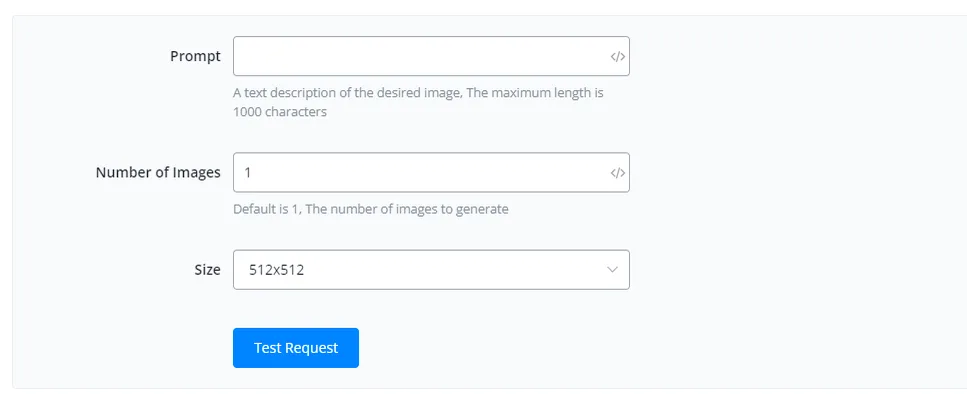
Prompt: this is the main input from which you want the AI to generate an image. It can be a question, an instruction, etc.
Number of Images: how many images you want the AI to generate for you. The default is 1
Size: the dimensions you want for the image. OpenAI accepts three sizes:
512x512
256x256
1024x1024
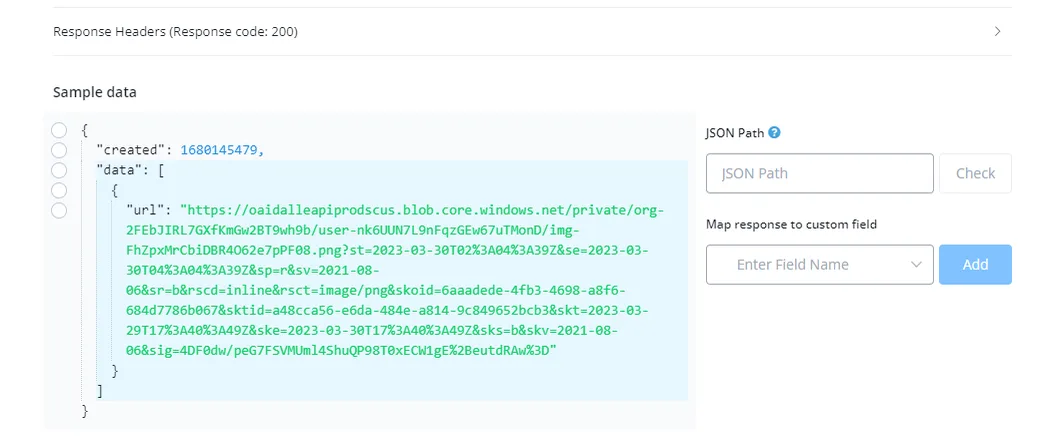
{
"created": 1680145479,
"data": [
{
"url": "https://oaidalleapiprodscus.blob.core.windows.net/private/org-2FEbJIRL7GXfKmGw2BT9wh9b/user-nk6UUN7L9nFqzGEw67uTMonD/img-FhZpxMrCbiDBR4O62e7pPF08.png?st=2023-03-30T02%3A04%3A39Z&se=2023-03-30T04%3A04%3A39Z&sp=r&sv=2021-08-06&sr=b&rscd=inline&rsct=image/png&skoid=6aaadede-4fb3-4698-a8f6-684d7786b067&sktid=a48cca56-e6da-484e-a814-9c849652bcb3&skt=2023-03-29T17%3A40%3A49Z&ske=2023-03-30T17%3A40%3A49Z&sks=b&skv=2021-08-06&sig=4DF0dw/peG7FSVMUml4ShuQP98T0xECW1gE%2BeutdRAw%3D"
}
]
}
Created: a date and time field that tells the moment the response was created. It is in Unix timestamp format.
Url: the public URL of your images.
Image generation consumes more computing power and, because of that, responses may take longer, depending on the prompts sent.
AI is a developing field and, because of that, the images produced can be quite inaccurate, given the complexity of the prompts provided. Finding the right prompt complexity can sometimes be a challenge.
The speech-to-text action is used when you want to convert an audio input into text. This has several use cases, such as implementation in IVRs.
.webp)
File URL: this is the URL of the audio you want to convert to text. Make sure it is a publicly hosted URL that ends with audio formats such as mp3, mpeg, etc.
Language: the language you want to convert the speech to. We use the ISO-639-1 format, that is, you need to provide the languages as 'en', 'es', etc.
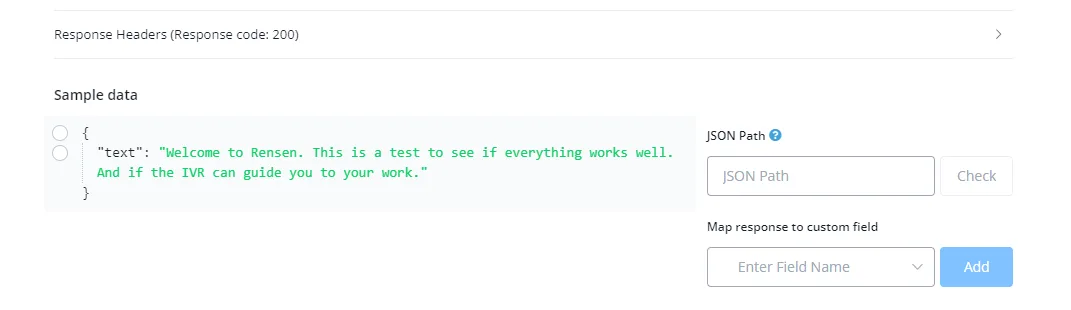
{
"text": "Welcome to Rensen. This is a test to see if everything works well. And if the IVR can guide you to your work."
}
Text: the text converted from the speech.
You can convert speech to text quite accurately using this feature. It is considered good practice to provide the audio in the same language as the desired output, for more accurate results and lower latency.
The Translate audio into English action is used when you want to convert an audio input into text in English. This has several use cases, such as implementation in IVRs.
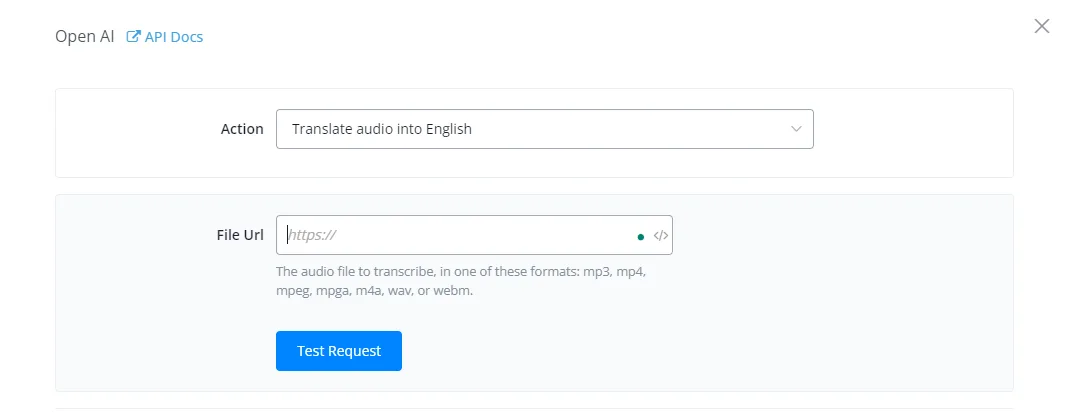
File URL: this is the URL of the audio you want to convert to text. Make sure it is a publicly hosted URL that ends with audio formats such as mp3, mpeg, etc.
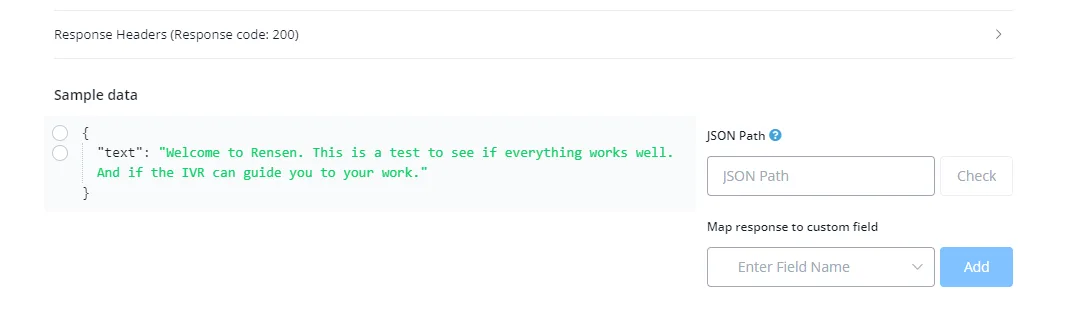
{
"text": "Welcome to Rensen. This is a test to see if everything works well. And if the IVR can guide you to your work."
}
Text: the text converted from the speech.
Testing different audio formats can give more (or less) accurate results. This is simply due to the quality of the audio provided, so split test different formats to find the best format for your use case.
Chat completion lets you send prompts to OpenAI in text form and receive an answer based on that prompt. It is similar to the text completion action, but it uses ChatGPT, which is also 10x faster and cheaper.
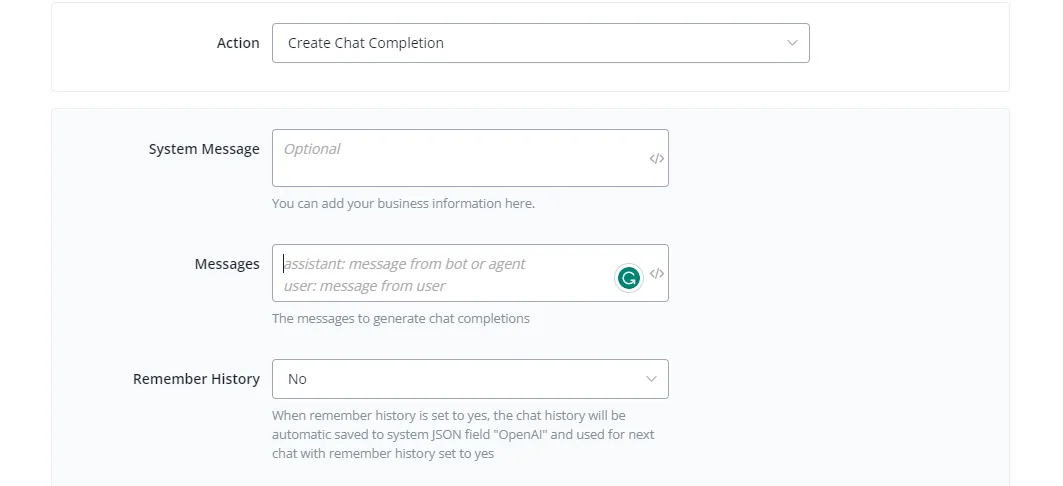
System message: an optional field, used to give additional context about you or about your business in chat completions.
You can set up detailed background information like this, if you are building a restaurant chatbot:
System: You are a helpful assistant at the NicoChat steakhouse. You will handle customer support, guide the user and make reservations. The restaurant's opening hours are 9 a.m. to 8 p.m., Monday to Saturday. Pets are not allowed. Always offer the coupon code when you think it is a good moment for it.
This is how you easily set up the chatbot's background information, and it can serve your customer based on what you instructed.
Message: this is the main input you want the AI to give an answer or output for. It is usually the user's response. It can be a question, an instruction, etc. You can add “user:” as a prefix to your prompt to give the AI more context, for example:
“user: is it going to rain today?”
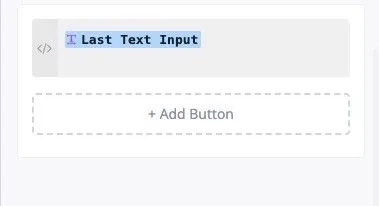
It also works if you do not put “user” before the response. You can use one of our system fields, such as {{last_text_input}}.
Remember the History: if you select “Yes”, the chat history between user and assistant will be saved in a system field, to be used later if needed.
The response of the OpenAI action will be saved automatically in the assistant role. You do not need to do anything.
In addition, we introduced a new JSON system field: {{openAI}}, which will hold the entire conversation history with the user:
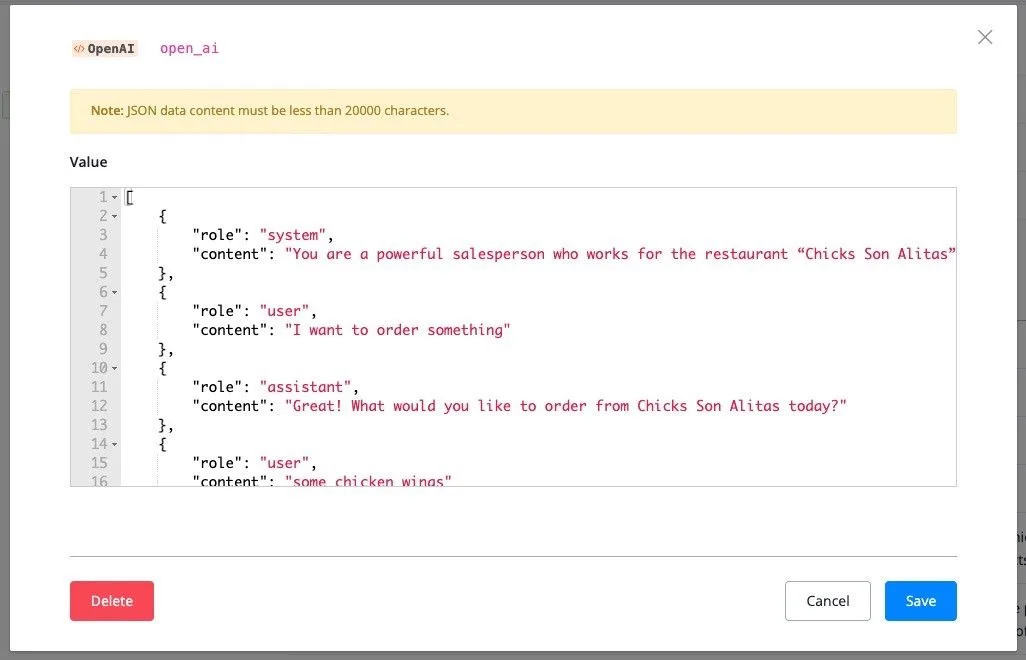
You will find the openAI system field in the user profile. This JSON saves the system configuration and the entire chat history.
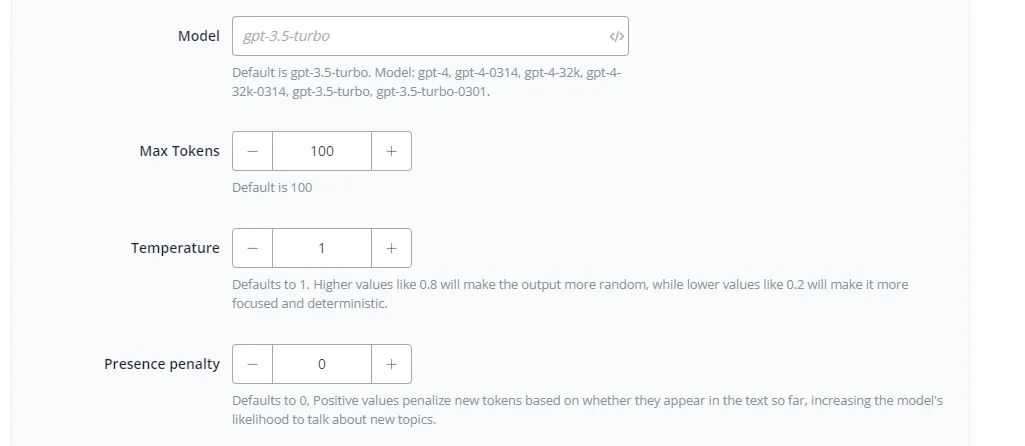
Model: the model you want to use in ChatGPT for the task. By default, gpt-3.5-turbo is selected.
Max Tokens: each task in ChatGPT consumes tokens. These tokens can be replenished with credit. This field limits the maximum number of tokens you want to use for a particular task.
Temperature: this acts as an accuracy gauge, where higher values give more random answers and lower values give more deterministic and focused answers. The default is 1
Presence penalty: this value makes ChatGPT use unique phrases and texts when completing a task. The higher the value, the less repetitive the words. The default is 0.
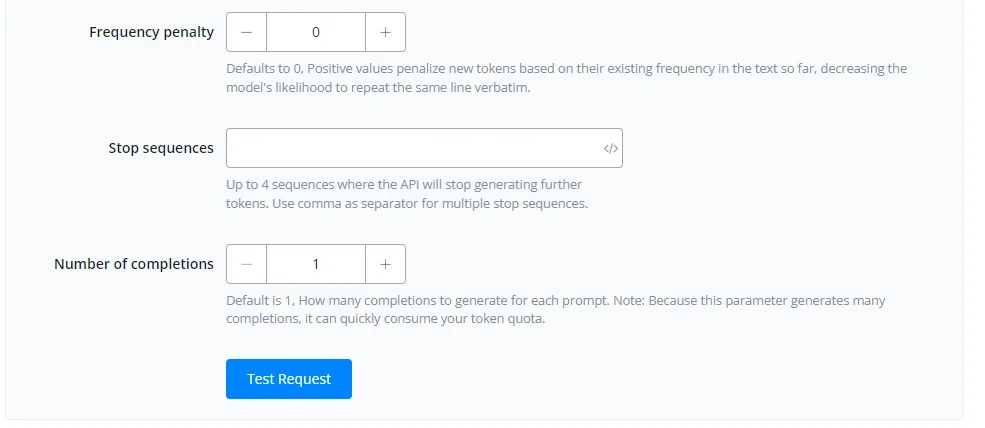
Number of completions: the number of times you want the AI to generate a response based on your prompt. The higher the value, the more responses. The default is 1, to avoid consuming tokens.
Best of completions: returns the best possible responses for your prompt. The default is 1. It works together with the Number of completions field to choose the best possible answer from a group of responses.
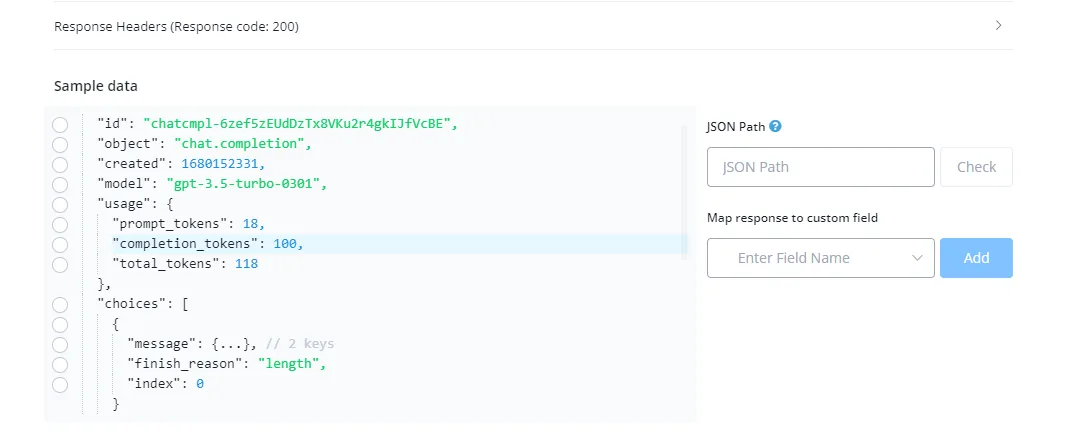
{
"id": "chatcmpl-6zef5zEUdDzTx8VKu2r4gkIJfVcBE",
"object": "chat.completion",
"created": 1680152331,
"model": "gpt-3.5-turbo-0301",
"usage": {
"prompt_tokens": 18,
"completion_tokens": 100,
"total_tokens": 118
},
"choices": [
{
"message": {...}, // 2 keys
"finish_reason": "length",
"index": 0
}
],
"messages": [
{
"role": "user",
"content": "can you help me with planting a mango tree?"
},
{
"role": "assistant",
"content": "Of course! Here are some steps to plant a mango tree: 1. Choose a spot: Mango trees need plenty of sunlight and well-draining soil. They also need protection from strong winds, so choose a spot that's sheltered. 2. Prepare the soil: Mango trees prefer slightly acidic soil, with a pH between 5.5 and 7. If your soil is too alkaline, add sulfur or peat moss to lower the pH. If it's too acidic, add lime"
}
]
}
Id: the id of the text completion. A unique value.
Object: the action/task you gave to OpenAI. In our case, “text_completion”.
Created: a date and time field that tells the moment the response was created. It is in Unix timestamp format.
Choice -> Content: the content field inside the choice object contains the answer to your prompt.
Message: this is a JSON with the complete conversation between the user and the assistant.
The chat completion action also accepts JSON input, so you can save the complete conversation between users and the assistant in a JSON, to give more focused and contextual answers in relation to that conversation.
If you use OpenAI embeddings together with ChatGPT, you will be able to train ChatGPT to answer questions about your business with complete ease!
Have you ever imagined giving a simple instruction, such as “create a flow to order pizza”, and NicoChat generating the entire flow automatically for you?
All of this is done with ChatGPT and NicoChat.
Have you thought about using the intelligent AI assistant with OpenAI embeddings to generate reply suggestions automatically?
This increases customer support efficiency and reduces service cost.
Have you thought about using OpenAI to reply automatically to the comments on your Facebook and Instagram — and, most importantly, with highly relevant and accurate answers for your own business?
This is possible because we use OpenAI embeddings to get highly relevant answers from your own business database, and everything can be done automatically.
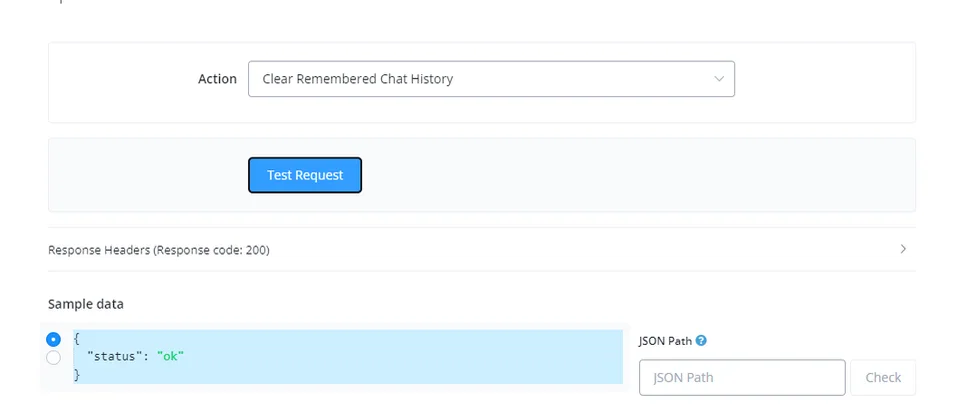
The Clear remembered history action deletes or clears the system field where the ChatGPT chat history is stored.
This action helps you reset the chat history.
OpenAI lets you provide a knowledge base of your use case or your business for the AI to generate answers from. This way, the AI gives more accurate, contextual and specific answers, instead of filtering them from the internet.
To create an embedding, go to Integrations and select OpenAI
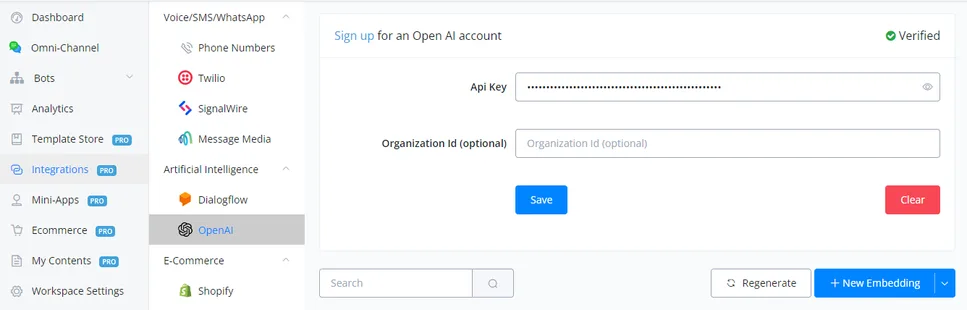
Click “New Embedding”
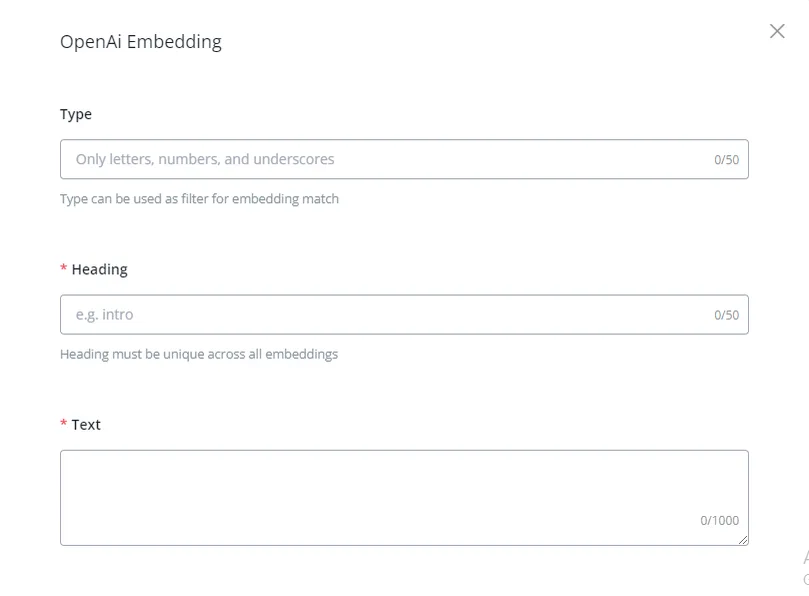
Type: an optional field. It is used to classify embeddings according to a given context and works as a filter when there are many associated embeddings. It is always better to fill in this field, because it gives more context and makes filtering easier for the AI.
Title: the topic of the embedding you created. The title or summary.
Text: this is the main text or body of the embedding. The maximum limit is 1,000 characters. You can put the details of the topic here for the AI to generate the answer.
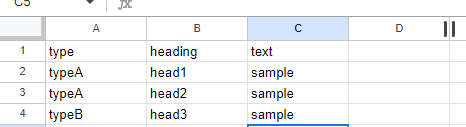
Instead of creating the embeddings manually, you can create them in bulk by importing them as a CSV file.
Click the dropdown arrow next to “New Embedding” and click “Import CSV”
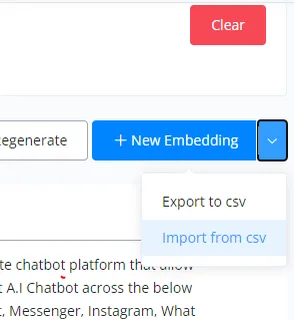
Now import the CSV file with the embeddings, and they will be created. If you have special characters such as è à ì ù, select “Import from csv without preview”
The embedding matching action is used to match the given prompt with the most similar embedding in the knowledge base
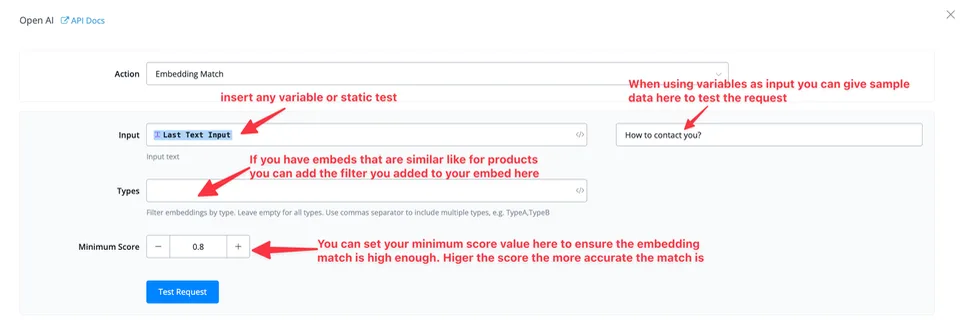
Input: this is where you type or map the prompt you want to match with the embedding.
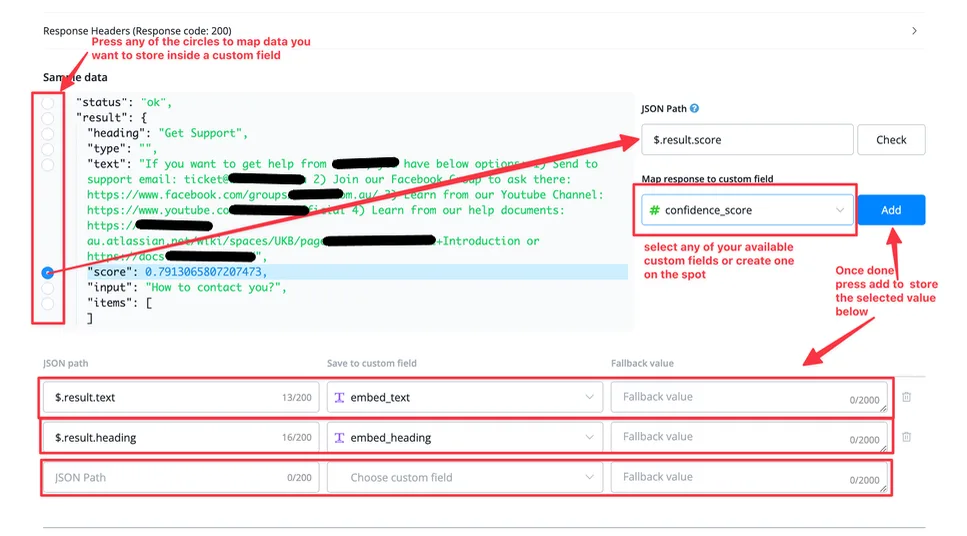
Embedding: the title of the embedding the prompt matches best.
Text: the text of the embedding the prompt matches best.
Input: the prompt you provide for the embedding search.
Score: this is the match percentage between the prompt and the available embeddings. You can use this score to decide whether the next prompt should be used for the completion or whether it is not enough and will generate inaccurate answers.
It is observed that a score of 0.79 or higher gives the best possible embedding match. Even so, this is an empirical value, and you should split test your use case to get the best possible answers.
The embedding matching and conclusion action is used to match the given prompt with the most similar embedding in the knowledge base and then generate the answer using that specific knowledge base.
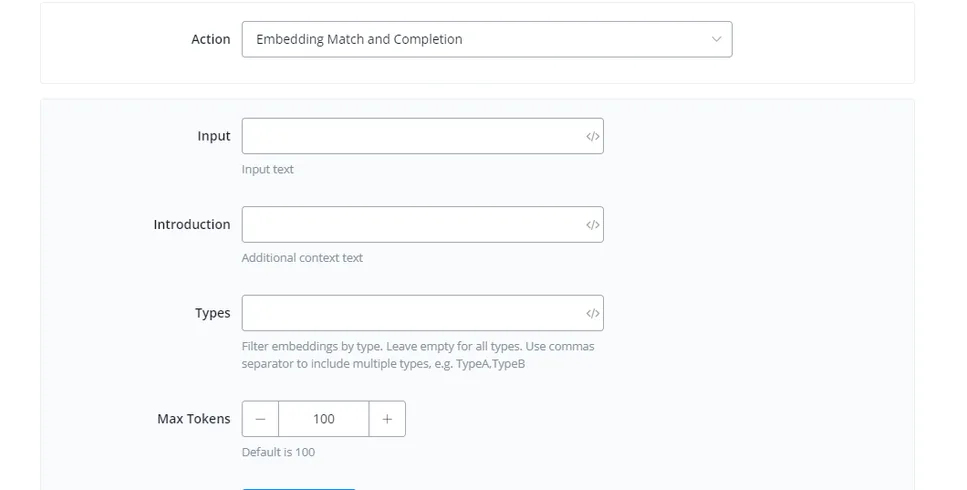
Input: this is where you type or map the prompt you want to match with the embedding.
Introduction: it is used to give more context to the prompt, making it more accurate, and it helps increase the embedding match score.
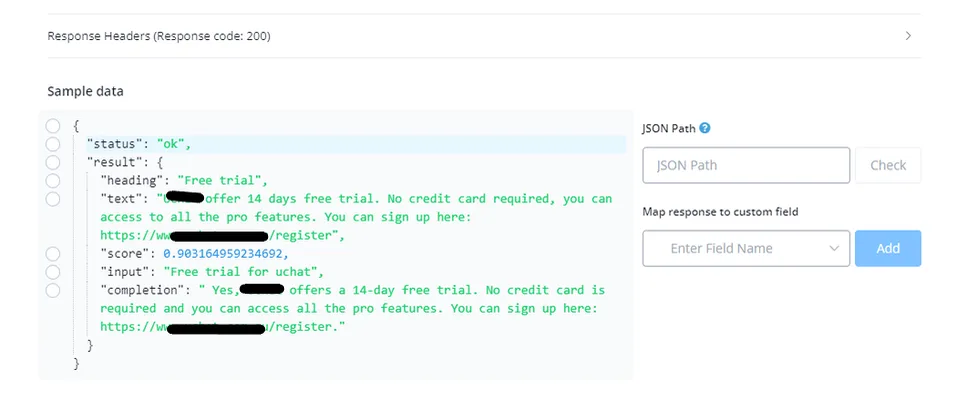
{
"status": "ok",
"result": {
"heading": "Free trial",
"text": "NicoChat offer 14 days free trial. No credit card required, you can access to all the pro features. You can sign up here: https://app.nicochat.com.br/login",
"score": 0.903164959234692,
"input": "Free trial for NicoChat",
"completion": " Yes, NicoChat offers a 14-day free trial. No credit card is required and you can access all the pro features. You can sign up here: https://app.nicochat.com.br/login."
}
}
Embedding: the title of the embedding the prompt matches best.
Text: the text of the embedding the prompt matches best.
Input: the prompt you provide for the embedding search.
Score: this is the match percentage between the prompt and the available embeddings. You can use this score to decide whether the next prompt should be used for the completion or whether it is not enough and will generate inaccurate answers. It is observed that a score of 0.79 or higher gives the best possible embedding match. Even so, this is an empirical value, and you should split test your use case to get the best possible answers.
Completion: this is the output, that is, the completion of the prompt provided by the user.
Using OpenAI embeddings to reply to the comments on your Facebook and Instagram
If you run ads or have a viral post on your Facebook or Instagram page, you may not have time to keep up with those comments.
You do not want to always reply with generic answers, and you also want the answer to be highly relevant to your business's questions.
That is why you need to use OpenAI embeddings to give highly relevant automatic answers.