

Connect with NicoChat
After logging in to your NicoChat account, go to Integrations and then to Shopify.
After logging in to your NicoChat account, go to Integrations and then to Shopify.
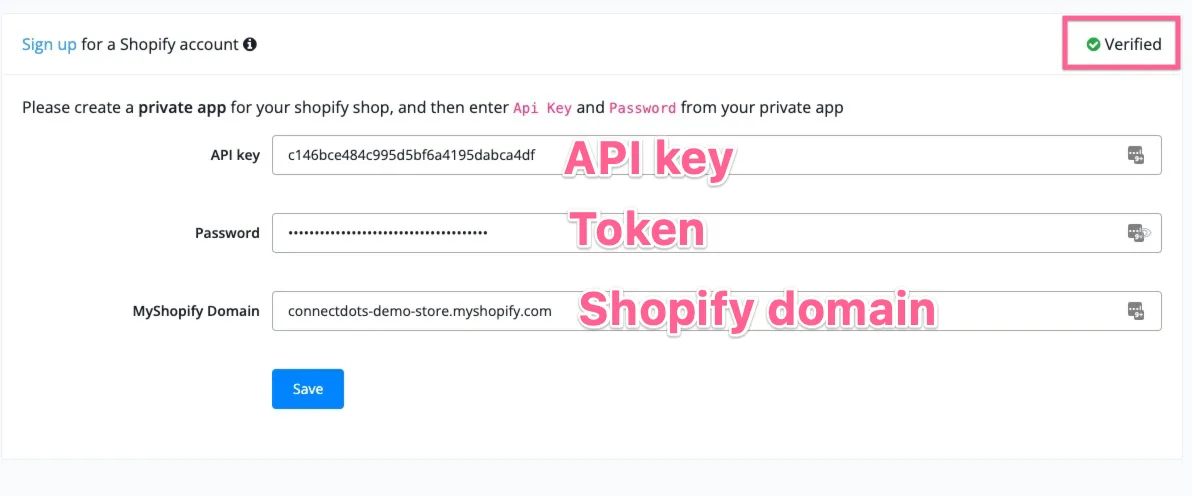
Once you fill in the API Key, the Token and the Shopify domain, the connection is done!
Warning
Note that you need to enter your Shopify subdomain in the integration. It has the format xxx.myshopify.com. Do not enter your custom domain here.
By following the 4 steps above, going to the Shopify website and logging in to your account, you can easily connect your Shopify account to NicoChat.
Once the connection is made, you will be able to use Shopify in the Action step. These are the functions you can use.
The description of each field is in the corresponding images.
Note
TIP – The functions work through API calls. This means that, by providing some inputs, you get the outputs from the servers. The outputs are saved in Custom Fields for later use.