

Keywords
Video on YouTube (not available for embedding)
With "Keyword", your users can go straight to SubFlows by typing keywords, instead of getting lost in menus or buttons.
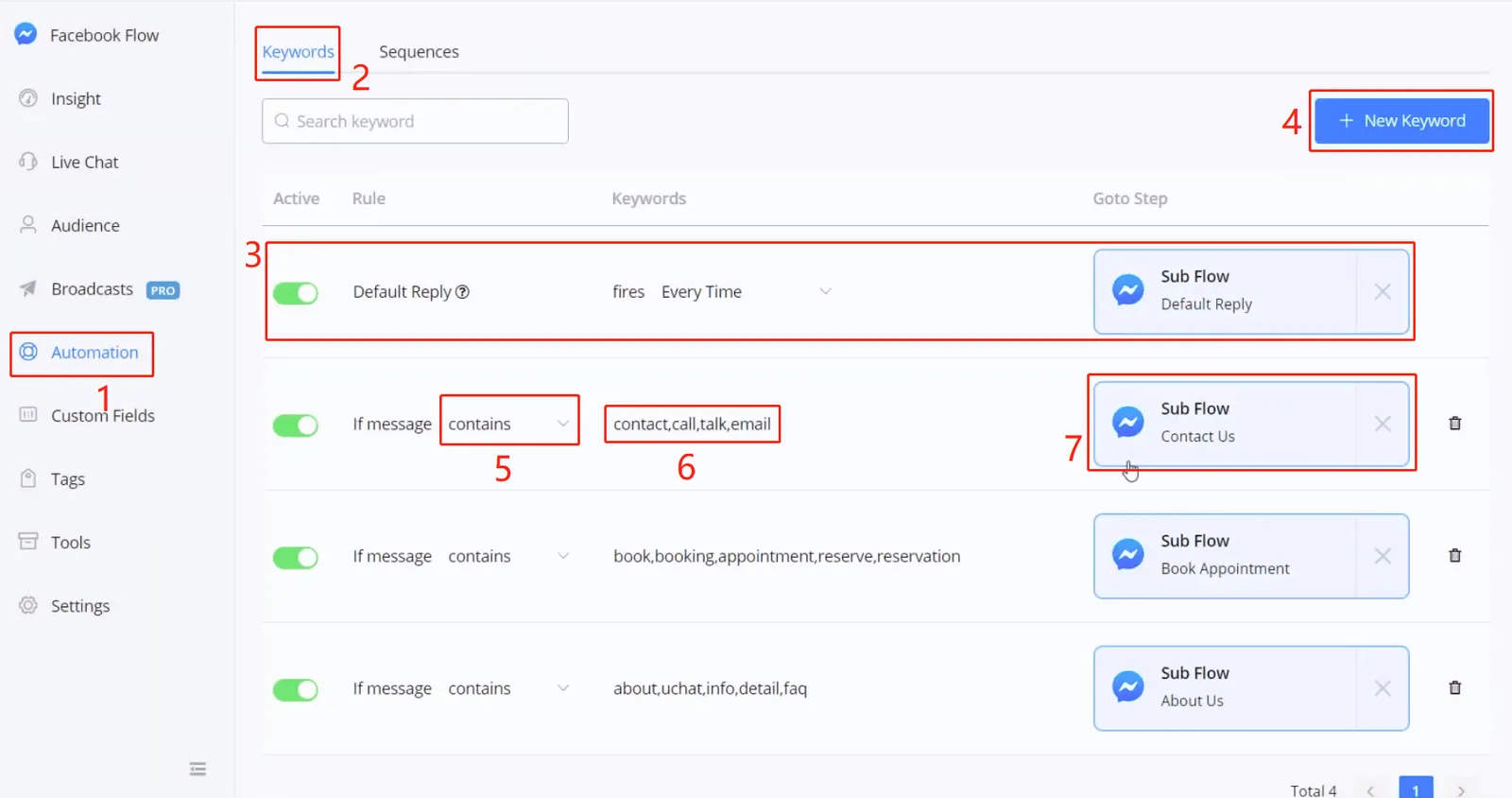
- go to "Automation" in the sidebar
- click "Keywords"
- for "Default Reply", see the explanation below
- click "+ New Keyword"
- choose a condition between "is", "contains" or "start with"
- enter one or more keywords, separated by commas only, with no spaces
- choose a SubFlow to send
The "Default Reply" is sent when the bot doesn't know what to reply. If the "Active" button is off or if no SubFlow is chosen for the "Default Reply", the main flow will be sent.
Note
TIP — this way, when you build and test flows, you can reply anything to quickly restart the conversation.
You can also adjust how often the "Default Reply" is sent. The default value is set to fire "Every Time".
You can also adjust how often the "Default Reply" is sent. The default value is set to fire "Every Time".
- Want a smarter bot?
- Want to reply with a sentence instead of sending a SubFlow?
- Want your bot to understand natural language, and not just keywords?
Try the Google Dialogflow integration! See how to set up Dialogflow.